How batches and lots work
Every trace, recall, and honest margin rests on one small idea: a lot. A lot is a traceable quantity of one item from one event, a delivery or a production run. Atlessa codes each one, watches it against a control date, tracks its stock through a handful of buckets, draws it oldest first, and links it end to end to the lots it came from and the orders it reached. This article is the model underneath: how a lot is coded and minted, where its stock sits, and how its chain is built. The step-by-step for tracing a lot and running a recall is in Trace a lot.
- Lot (or batch): a traceable quantity of one item from one event, a delivery or a production run.
- Lot code: the internal code Atlessa gives it (RCV- for a receipt, PRDC- for a run).
- Stock buckets: where a lot's quantity sits, which is why on hand (everything on your books) is more than available (only what you can draw).
- Batch-traced: tracked lot by lot. SKU-traced: tracked by SKU, no per-lot codes.
- Control date (expiry, best-before, or use-by): drives a lot's state.
- FEFO (first expiry, first out): the draw rule. Earliest control date first; oldest lot when an item has no control date.
- Exact (recorded) or Estimate (inferred): how sure each link in a lot's chain is.
What a lot is, and how it gets its code
A lot pins a quantity of one item to the single event it came from, so a delivery of jojoba oil is one lot and a production run of lip tint is another. You never ask "where did this oil come from" in general, only about one batch that arrived on one day at one cost. Every receipt mints a lot and every closed run mints a lot, so both ways stock enters your shop leave a traceable batch behind.
Atlessa mints the internal lot code for you, sequentially and per shop, with a separate family for each source:
- RCV- codes for receipts, minted when you receive stock.
- PRDC- codes for production, minted when you close a run.
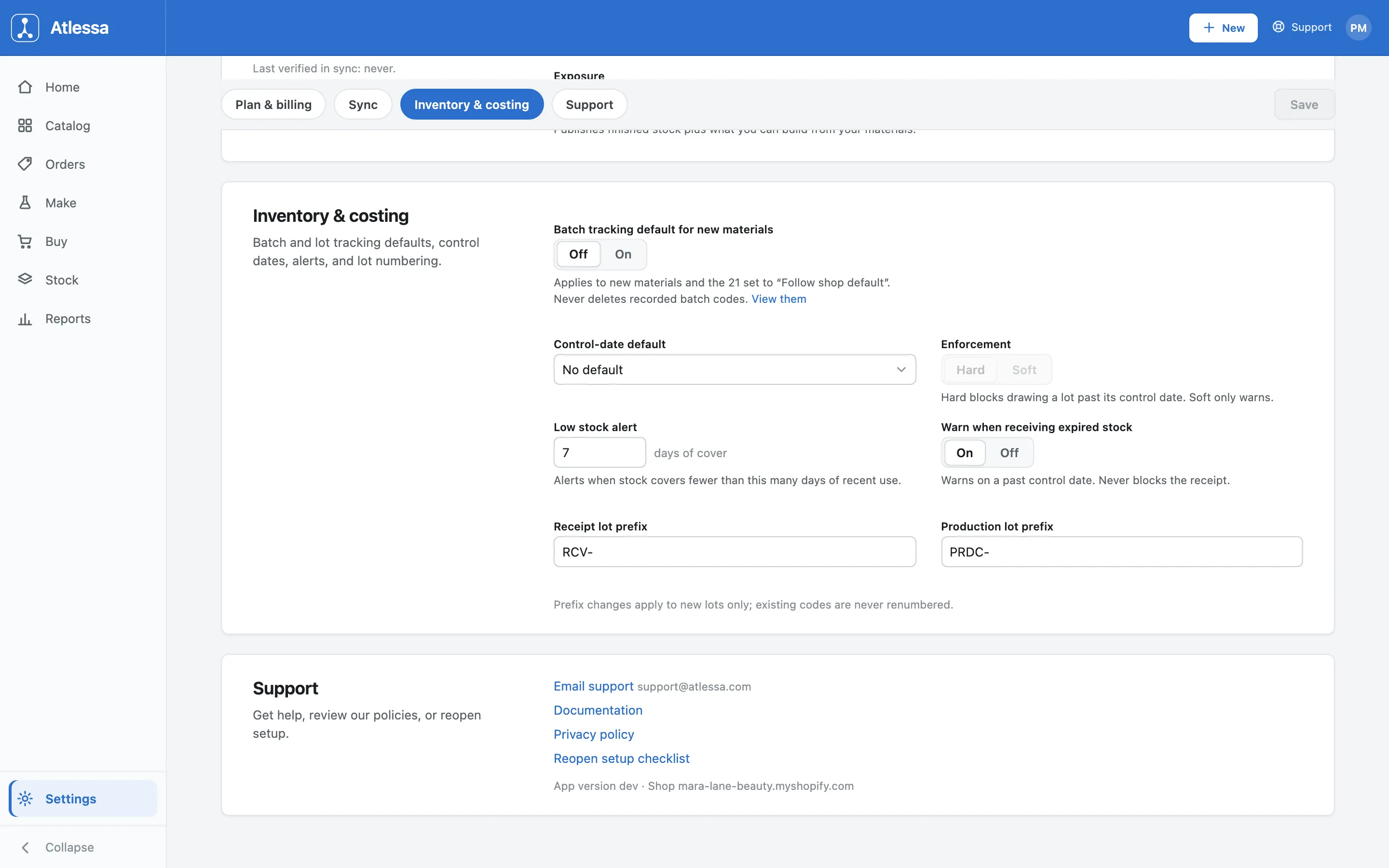
Each family runs its own zero-padded sequence: RCV-0001, RCV-0002, then PRDC-0001, PRDC-0002. The prefixes are yours to change in Settings (Receipt lot prefix and Production lot prefix), and a change applies to new lots only: existing codes are never renumbered, so a code you have already printed or quoted stays as it was.
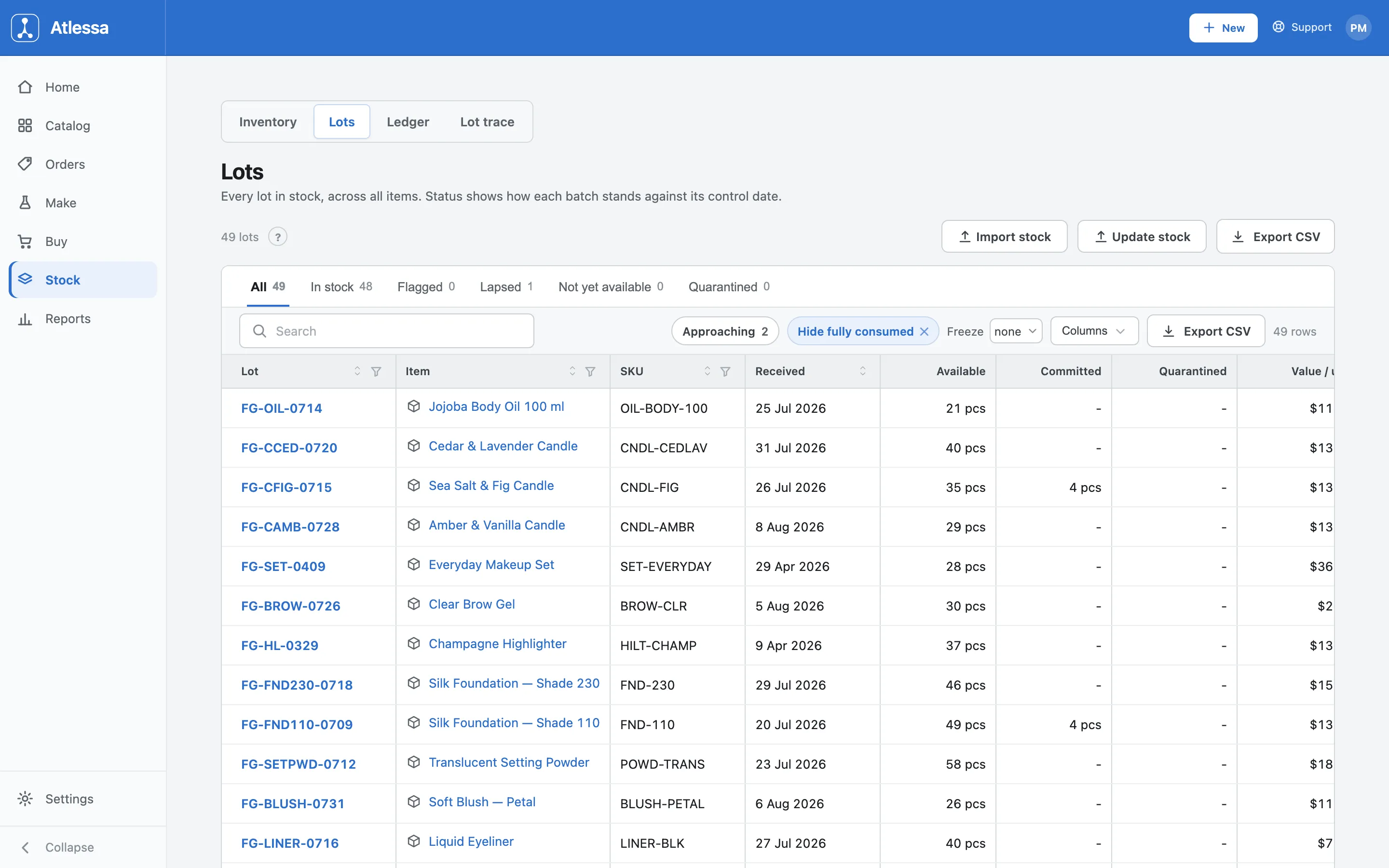
The internal code is not the only one a lot carries. It also keeps the supplier's own batch code, printed on the delivery (for example JOJ-2409) and recorded at receiving so you can map their code to yours. Finished goods received as stock, rather than made, can also carry a finished code (for example FG-OIL-0714). So one lot can answer to several names, all leading back to the same batch.
Where a lot's stock sits: buckets and balanced moves
A lot's quantity is not a single number that ticks up and down. It sits in buckets, and every stock event is a balanced move between them: a quantity leaves one bucket and enters another, nothing created or destroyed. So the total across the buckets only changes when stock genuinely arrives (a receipt) or is made (a close), which keeps your books honest. The buckets:
- free: available to draw or sell.
- committed: reserved to an order or run.
- consumed: used up.
- WIP: drawn into a released run.
- finished: a made lot's output.
- scrapped: wasted.
- quarantine: held.
The everyday actions are just moves between them: reserving moves free to committed, fulfilling moves committed to consumed, releasing a run moves free or committed to WIP, closing a run turns WIP into a finished lot, holding moves free to quarantine, scrapping moves to scrapped. The whole system is one ledger of balanced moves.
This is why available is not on hand. On hand is everything on your books, across every bucket. Available is only what you can use: free stock minus anything held out of reach. Stock that is hard-lapsed, not yet available, or in quarantine is on your books but out of available. So a lot can show a healthy on-hand figure and still be unavailable, and that gap is always one of the held-out states below.
Batch-traced or SKU-traced
Not every item needs lot-level tracing, so each item has a trace mode:
- Batch-traced: records a lot code and, where it has one, a control date at receiving, and is tracked lot by lot, so you can trace each batch through to the order it shipped in. Use it for anything with a shelf life or a recall risk.
- SKU-traced: tracked by SKU alone, no per-lot codes. You still know how much you hold and what it cost, but not individual batches. It keeps low-risk, high-turnover items simple.
The default for new materials is a shop-level setting (Settings, Inventory & costing, "Batch tracking default for new materials"): set the house rule once and each new material can follow it, or set an item mode deliberately when it needs to differ.
Control dates and lot states
A control date is a best-by or use-by that a lot is watched against. How it is watched is an item-level choice every lot inherits: the date type (expiry, best-before, or use-by), whether it is hard or soft, and a warn-lead window (how far ahead to warn). Expiry is always hard; best-before and use-by default to soft. You configure it once, and Atlessa applies it to every batch you receive.
Atlessa derives each lot state from that configuration and the lot date rather than storing it, so every screen agrees:
- In stock: fine.
- Approaching: within the warn-lead of its control date.
- Flagged: past a soft control date. It warns, but can still be drawn.
- Lapsed: past a hard control date. Held out of available and blocked from being drawn.
- Not yet available: has a future "available from" date (a cure or set time), so it sits in free but cannot be sold or packed until that date.
- Quarantined: held by hand.
The Lots list shows all of these as status tabs with counts.
Whether a control date has teeth is an item-level choice: each item is Hard (drawing a lot past its control date is blocked) or Soft (it only warns). The Enforcement setting in Inventory & costing sets only the shop default that materials set to "Follow shop default" inherit; a material set deliberately, and every finished variant, carries its own. Expiry is always hard whatever the setting, so there is no "Expiry, Soft". The "Warn when receiving expired stock" toggle governs the soft case: it warns you if a lot control date is already past but still lets the receipt through. Where the control date is hard, receiving a lot already past its date is blocked until you record an override (a reason from a fixed list plus a mandatory note), which is stamped on the movement. This one Settings section also holds the lot prefixes and the batch-tracking default.
Quarantine is the one state you set by hand. From a lot trace board, "Hold in quarantine" keeps the stock on your books but stops it being drawn or sold (a balanced move from free to quarantine), which is what you want while you investigate a batch. Releasing it returns the stock to free. Nothing is lost in the hold; it is simply set aside.
Oldest first, and why
When a run or an order draws a batch-traced item, Atlessa draws by two keys, a rule it tags "First out". This is FEFO, first expiry first out: it draws the suitable lot with the earliest control date first, even if a newer delivery has an earlier best-by. Where the item has no control date, it falls back to the oldest lot first (FIFO). It is the same rule when a run releases its materials and when an order reserves its finished stock.
Drawing first out does two jobs. It uses stock before it lapses, so less is wasted. And it keeps the trace exact: the draw records precisely which received lots went into a run or an order, so a finished lot traces back to the material lots it consumed and a material lot forward to the orders it reached.
The lot journey: genealogy, splits, and branches
Lots form a chain, and that chain is the genealogy. A material lot (RCV-) is consumed by a run into WIP, which on close mints a finished lot (PRDC-), which is reserved to and consumed by an order. The Lot journey board on any lot trace page reads left to right in those stages: Receiving, Production, Made lots, Orders. Every code is a link to its own board, and the count on each node is how many orders it reached.
The journey follows the physical stock, not just the paperwork:
- It follows splits forward, so each split child carries its parent's physical material and shows up in the chain.
- It shows branches: other runs that consumed the same physical lot, and where each went.
Because the chain is anchored to the physical batch, you can read it either way: from a material lot forward to every order it reached, or from a finished lot backward to every material that made it.
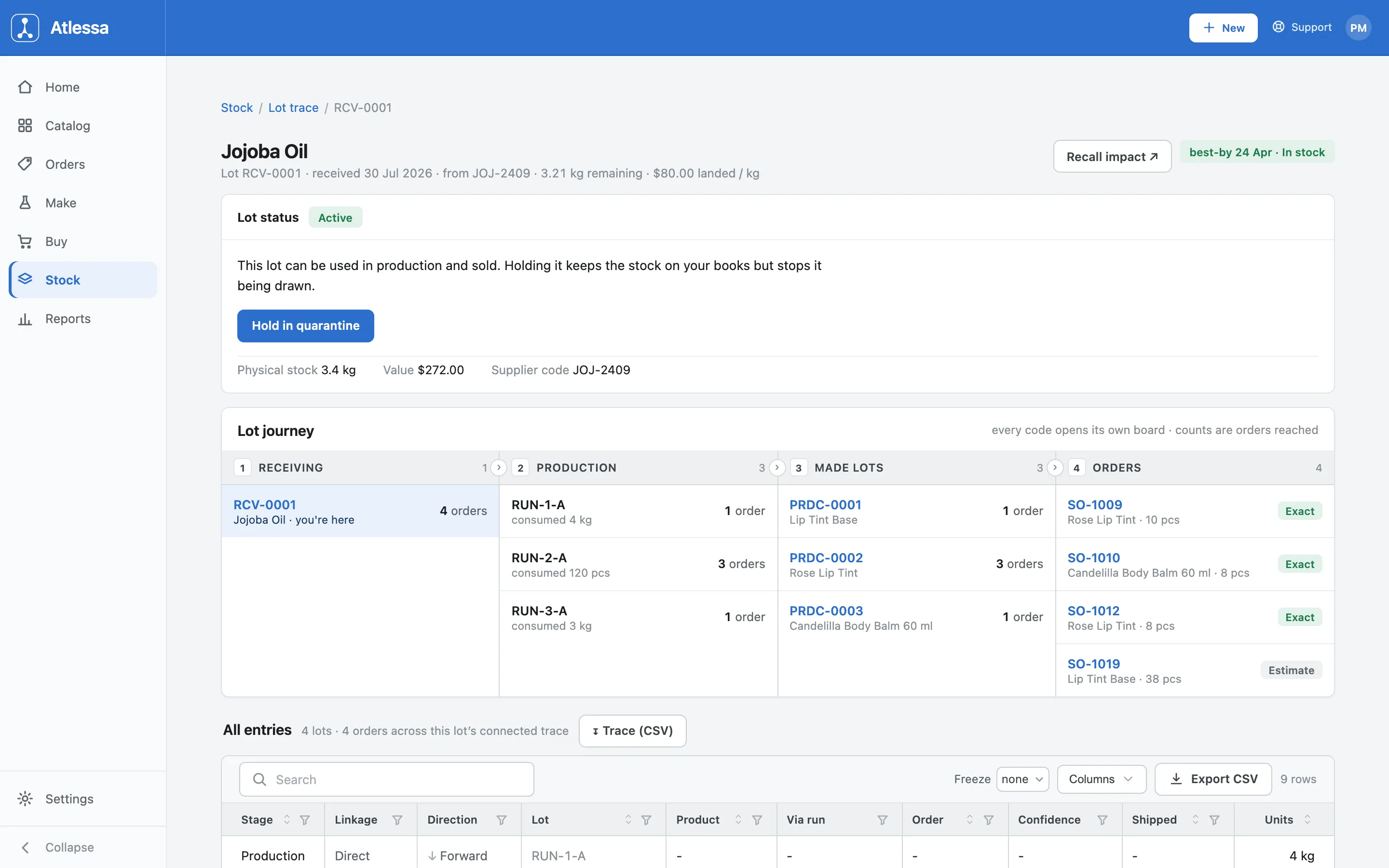
The same board shows the physical figures behind the buckets: a "Physical stock" line and a "Value", alongside the supplier code and landed cost, and a control-date pill with the lot date and derived state. So one screen carries the minting, the cost, the control date, the quarantine control, and the full chain, which is why most trace questions get answered here.
How sure a link is: Exact or Estimate
Not every link is known to the same certainty, and Atlessa is honest about which is which. It depends on how the link was recorded, and there are two tiers:
- A material lot to its orders is Exact, taken straight from the order's lot-bound reservations: the oldest-first draw wrote down exactly which material lot backed which order.
- A finished lot to its orders is, by default, a date-window Estimate, inferred by the oldest-first rule, because nothing recorded which finished lot shipped in which order.
That default upgrades the moment you record it. Assigning lots at pack time (the pack-capture link, covered in Fulfil an order) ties a specific finished lot to a specific order, upgrading that one link from Estimate to Exact. So on the journey board each order is tagged Exact (assign or scan confirmed) or Estimate (inferred by rotation). The distinction matters for confidence, not coverage: both are included in a recall, and an Estimate is a safe over-set (it may reach a few orders more than needed), never a missed one.
"Recall impact" turns any lot into a flat pull list of every affected order, tiered by that confidence, with the units and value shipped, ready to export for a recall or audit. The pull list defaults to Exact plus Estimate, and the "orders to notify" count covers just those two tiers; the lowest-confidence Possible tier is an opt-in you switch on with a "Possible +N" toggle, and its rows join only once you do. The step-by-step for finding a lot, reading its journey, and running that recall is in Trace a lot; recording lots at pack time to make links Exact is in Fulfil an order. This article is the foundation both stand on.
Common questions
- What is the difference between a lot and a batch?
- Nothing: two words for the same thing, a traceable quantity of one item from one event. Atlessa uses "lot" for the coded record and "batch" for the physical stock it stands for.
- What are the stock buckets, and why is available less than on hand?
- A lot's quantity sits in buckets (free, committed, consumed, WIP, finished, scrapped, quarantine), and every event is a balanced move between them, so nothing is created or destroyed. On hand is everything on your books across all buckets; available is free stock minus anything held out. Committed, quarantined, hard-lapsed, and not-yet-available stock is on hand but out of available, which is why the two differ.
- What makes a link Exact rather than an Estimate?
- How it was recorded. A material lot to its orders is Exact, from the order's lot-bound reservations. A finished lot to its orders is by default a date-window Estimate inferred by the oldest-first rule, unless a pack-capture link (assigning lots at pack time, see Fulfil an order) upgrades it to Exact. Both are included in a recall; an Estimate is a safe over-set, not a missed order.
If it is not working
- A lot cannot be drawn.
- It is in a held-out state: Lapsed under hard enforcement (past a hard control date), Quarantined (held by hand), or Not yet available (a future "available from" date). Check its state on the Lots list tabs or its trace board. Releasing a quarantine or reaching the available-from date returns it to available; a lapsed lot stays blocked under hard enforcement.
- Available is less than on hand.
- Some stock is held out of available though still on your books: committed to an order or run, in quarantine, lapsed (past a hard control date), or not yet available. Open the lot to see which bucket the difference is in.
- A link shows Estimate, not Exact.
- No pack-capture link tied that finished lot to the order, so Atlessa inferred it by the oldest-first rule. Assigning lots at pack time (see Fulfil an order) records the exact finished lot and makes future links Exact. The Estimate is still included in a recall meanwhile; it is a safe over-set, not a gap.