Receive stock
Receiving is how the materials and finished goods you bought become real stock: on hand, costed, and traceable. One delivery becomes one receipt, the stock goes on the shelf, and a lot is minted you can follow all the way to the customer. It is also where you record what a delivery cost, so every margin downstream is honest. Receipts are the permanent record of everything that has come in.
- Receipt: one recorded inward delivery, the append-only event that turns bought stock into on-hand stock.
- Landed cost: the all-in cost per unit (price plus shipping and duties) that values the receipt into your stock average.
- WAC (weighted average cost, or stock average): that average. Each receipt's landed cost updates it.
- Lot: the traceable batch every receipt mints, carrying through to sale.
- Batch-traced: an item Atlessa tracks by lot. At receiving you record a lot code and, where the item has one, a control date (the best-by or use-by the batch is watched against).
- Purchase unit: lets you buy in a different unit than you store; Atlessa converts.
Steps
- Open Receive stock. Find it under Buy, or on the Receipts list.
Buy opens on the Receipts list, the append-only ledger of every inward delivery. Each row is one receipt: the item and SKU, whether it is batch-traced, the received date, the lot it minted, how much was bought and stocked, the unit and landed cost, any control type and date, and the supplier. The top row here is a Jojoba Body Oil receipt from 27 Aug 2026: lot FG-OIL-0714, 30 pcs stocked, $0.392667 unit cost, $11.78 landed. You can search, freeze columns, and Export CSV. Nothing here is edited or deleted; it is the history you trace and audit against.
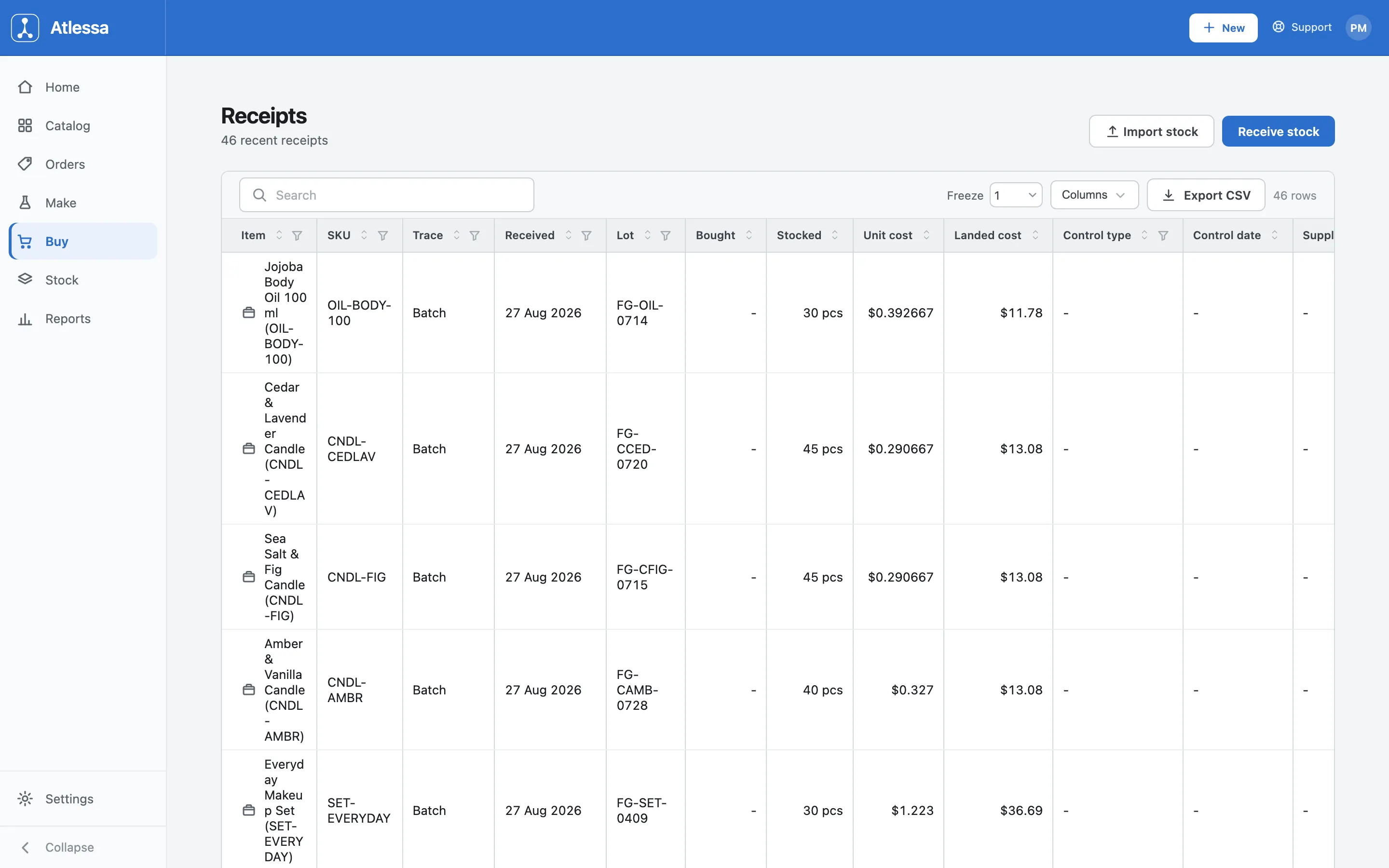
The Receipts list: the append-only ledger, one receipt per row, with the lot, quantities, unit and landed cost, and supplier. Two buttons sit above the list:
- Receive stock: the form for a single delivery, the flow below.
- Import stock: a separate bulk path for opening or initial stock, loading what you already hold rather than a fresh delivery.
- Pick the item and enter how much arrived.
Open the Item picker and it lists everything you can receive, each labelled by type and SKU, like Amber & Vanilla Fragrance (Material, RM-FRAG-AMBER) or Candle Jar + Wick (Material, PK-CANDLE). You can receive raw materials (RM-*), packaging (PK-*), and finished variants, so a delivery of jars and a batch of finished candles come in the same way. Search by name or SKU, or pick from the list.
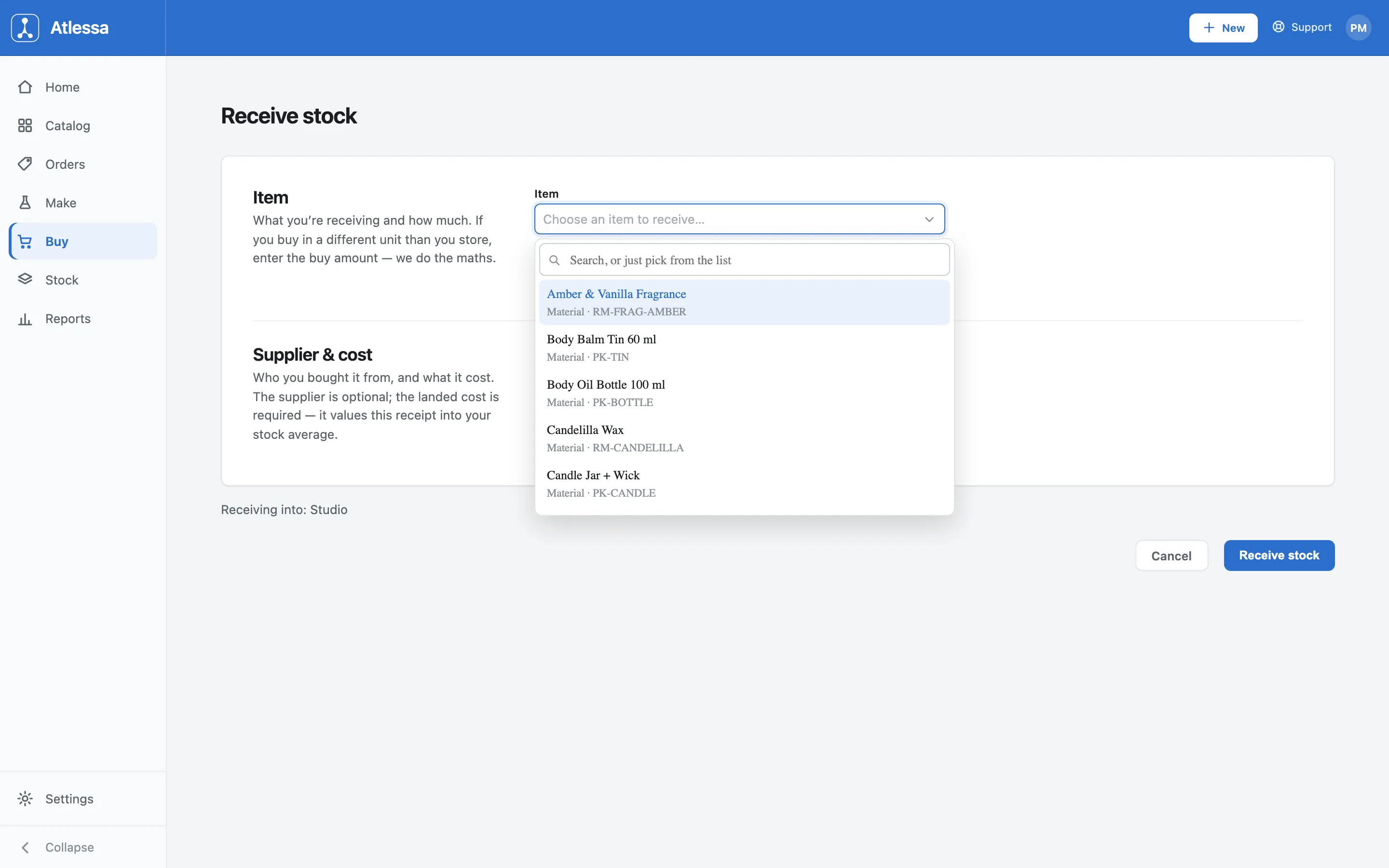
The item picker: raw materials, packaging, and finished goods, each labelled by type and SKU. With an item chosen, the Item section asks for the Quantity received in the unit you store it in (kg for Jojoba Oil). Bought in a different unit, a case or a sack? Click + Add a purchase unit, enter the buy amount, and Atlessa converts into your stock unit. As the subtext says: enter the buy amount and we do the maths.
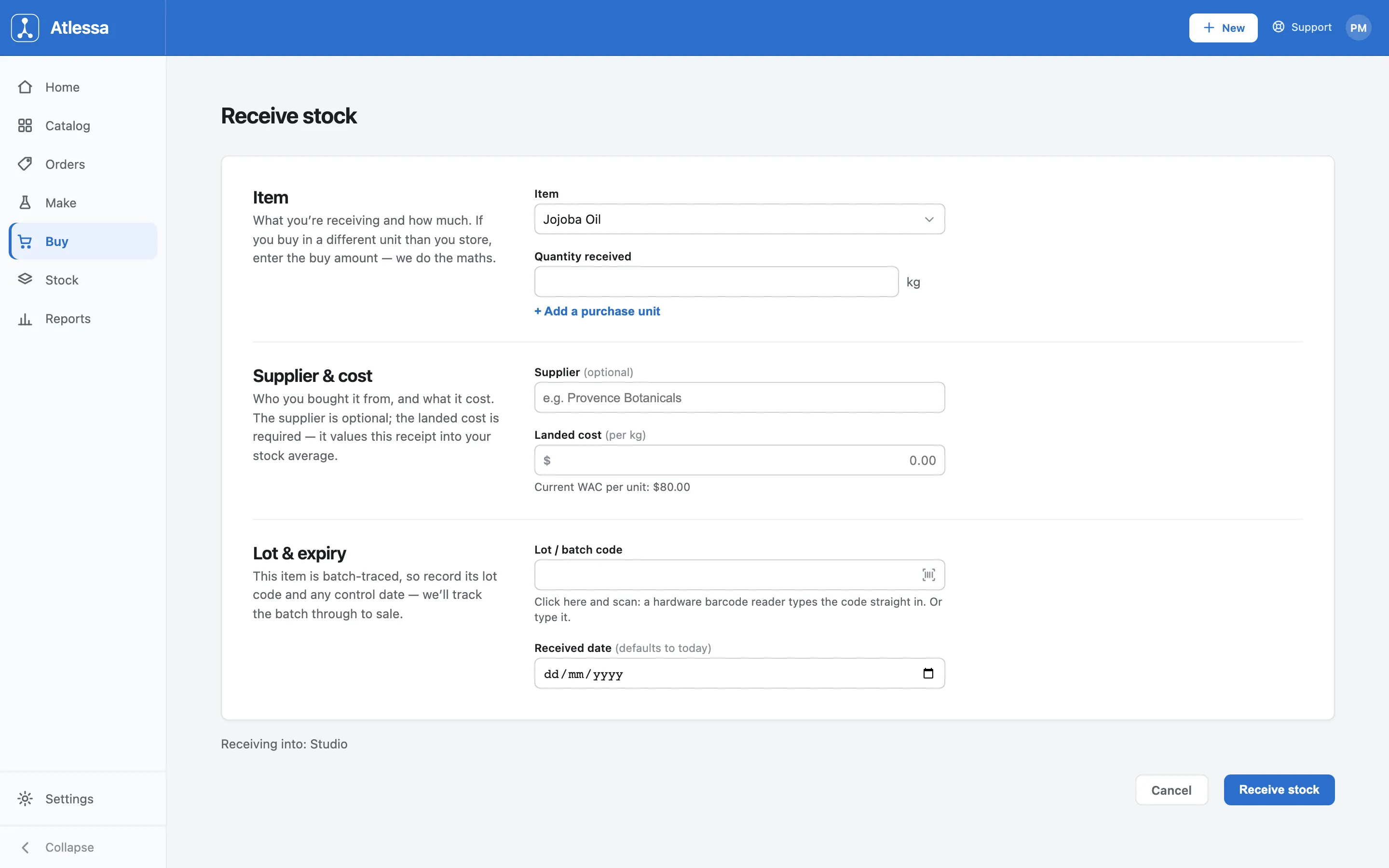
The filled form for Jojoba Oil: Item and quantity, Supplier and landed cost, and the Lot & expiry section. - Record the supplier and the landed cost.
In Supplier & cost:
- Supplier is optional (placeholder "e.g. Provence Botanicals"), a note of who you bought from.
- Landed cost is required, entered per stock unit (per kg here). It values this receipt into your stock average, so it is the one number receiving cannot go without. Enter your all-in cost, price plus shipping and duties, not the sticker price.
Just under the field, a live hint reads Current WAC per unit ($80.00 here): your weighted average cost right now, before this receipt lands. On save, this receipt's landed cost blends into that average, so the hint checks the cost you are about to record against the stock you already hold.
- For a batch-traced item, record the lot code and any control date.
If the item is batch-traced, a Lot & expiry section appears (a non-batch-traced item skips it entirely).
- Lot / batch code: click into the field and scan (a hardware barcode reader types it straight in), or type it yourself.
- Control date shows only where the item carries one, the best-by or use-by the batch is watched against.
- Received date defaults to today; change it if the stock arrived earlier.
Atlessa tracks the batch from this lot code through to sale, making the lot traceable end to end (you follow it in Trace a lot).
If the control date you enter is already in the past, what happens depends on how the item's control date is set:
- Hard: receiving is blocked. You cannot save until you record an override, a reason from a fixed list plus a mandatory note, stamped on the receipt movement for the audit trail.
- Soft: you are only warned (governed by the Settings toggle "Warn when receiving expired stock") and can carry on.
So a hard date stops expired stock landing unnoticed; a soft date lets it through with a heads-up.
- Receive stock.
The footer shows where the stock lands, Receiving into: Studio (your stock location), with Cancel and Receive stock. Click Receive stock and four things happen at once: the receipt is recorded, the stock goes on hand, a traceable lot is minted, and you land back on the Receipts ledger with the new row at the top. From here the lot is live: it can be reserved, consumed, and traced like any other.
Receipts are append-only. No edit, no delete; submitting the same receipt twice is a no-op, not a duplicate. That is deliberate: the ledger is your audit trail, so a mistake is corrected with a new movement (an offsetting receipt, or Adjust stock from a lot's Actions menu on the Stock grid), never by rewriting history.
Common questions
- What is landed cost versus the unit cost I see on the ledger?
- Landed cost is what you enter: the all-in cost of the whole delivery per stock unit, including shipping and duties, not just the invoice price. The unit cost on the ledger is what that works out to once Atlessa accounts for the receipt. Landed cost is required because it values the receipt into your stock average, so getting it right keeps every downstream margin honest.
- Why can I not edit or delete a receipt?
- By design: the append-only ledger stays a true record of everything that came in, so a mistake is corrected with a new movement, never by rewriting history. Add an offsetting receipt, or use Adjust stock from a lot's Actions menu on the Stock grid, and the wrong receipt and its correction sit side by side, which is exactly what an audit wants.
- How does receiving change my WAC?
- Your WAC (weighted average cost) is the running average value of the stock you hold. Each receipt blends its landed cost into that average, weighted by quantity, so a delivery cheaper than your average pulls the WAC down and a dearer one nudges it up. The "Current WAC per unit" hint shows the average before this receipt, so you can sanity-check the cost you are about to record.
- What is a control date, and do all items have one?
- A control date is the best-by or use-by a batch is watched against, so Atlessa can flag it as it approaches or lapses. Only some items carry one, so the field appears on Lot & expiry only for items that do. Items with no control date simply do not show it.
- Can I receive finished goods, not just raw materials?
- Yes. The picker includes finished variants alongside raw materials (RM-*) and packaging (PK-*), so a batch of finished candles is received the same way as a sack of wax. Each still mints a lot and takes a landed cost, so finished stock you bought in is costed and traceable just like anything you made.
- What is the difference between Receive stock and Import stock?
- Receive stock records one fresh delivery through the form in this article. Import stock is the separate bulk path on the Receipts list for opening or initial stock, loading the stock you already have rather than logging a new arrival. Use Receive stock for deliveries going forward; Import stock once, to get started.
- I buy in cases but store in single units. How do I receive that?
- Use + Add a purchase unit in the Item section. Enter the amount in the unit you bought (a case, a sack) and Atlessa converts it into the unit you store. The stock lands in your storage unit and the landed cost is read against that same unit.
- What does "Receiving into: Studio" mean?
- It is not a choice you make. Atlessa v1 is single-location: every receipt lands in your shop's primary Shopify location, and the footer just names it so you see where the stock is going before you save. "Studio" is this sample shop's name for that location; yours shows whatever your primary Shopify location is called.
If it is not working
- The item is not in the picker.
- You can only receive an item that exists in your catalog. If it is missing, add it as a material or product in Catalog first, then come back and receive it.
- Receiving is blocked because the control date is in the past.
- For a batch-traced item with a hard control date, a past control date stops the receipt until you record an override: pick a reason from the fixed list, add the mandatory note, and the override is stamped on the receipt movement for audit. A soft control date does not block; it only warns (governed by the Settings toggle "Warn when receiving expired stock"). If you did not mean to receive expired stock, check the control date before overriding.
- It says the lot code already exists.
- Lot codes are unique per item, so a code already used for the same item is rejected with a rename prompt. Rename it (for example add a suffix) and receive again. The supplier's own batch code still maps back through supplier-batch search, so you do not lose the link to the delivery.
- The landed cost or WAC looks wrong.
- Landed cost is entered per stock unit, so a figure that looks off is usually a unit mismatch. Check the unit shown on the field, and if you bought in a different unit, confirm the purchase-unit conversion is set so the cost is read per stored unit, not per case.
- I received the wrong thing, or the wrong amount.
- Do not edit the receipt: receipts are append-only. Correct it with a new movement, an offsetting receipt for the same lot, or Adjust stock from the lot's Actions menu on the Stock grid (with a reason such as Recount, Correction, Rounding, Damage, or Loss). Both the original and the correction stay on the ledger, keeping your trace and audit trail intact.