Cash in stock
Every unit on your shelf is money you have already spent and not yet sold back. Cash in stock adds it all up at what you actually paid, then sorts it into what is healthy, what has aged, and what is at risk of being wasted before it sells. It is the report you read to find cash you can free up and stock you should move first.
- Cash in stock: money tied up in inventory, valued at WAC (weighted average cost).
- WAC times on hand: each item's value, your stock average times the quantity you hold.
- Age: the age of an item's oldest on-hand lot, banded into 0-15, 15-30, 30-90, 90-180, and 180+ days.
- At risk: a separate cut. Stock whose nearest on-hand control date (best-by or use-by) falls inside the window you set, so it may lapse or spoil before it sells.
- Value buckets: Free it up (old, high value), Write off (old, low value), At risk (near a control date), All aged (90+ days).
- Trapped cash: value aged past its prime and no longer moving.
Steps
- Open Cash in stock. It is one of the Reports (Exports, Margins, Cash in stock).
The report values all your stock at WAC as of today, as the subtext says: "As of 28 Aug 2026, at weighted-average cost." The heading reads $42,077.83, the whole of what your shelves are worth now. It is not a fresh costing run: it reads the stock value you already hold and rearranges it for triage (valuation below). A banner gives the verdict: "None of your $42,077.83 in stock has aged past 90+ days. No cash is trapped yet." That is the good case; the report only fills with trapped cash as stock ages.
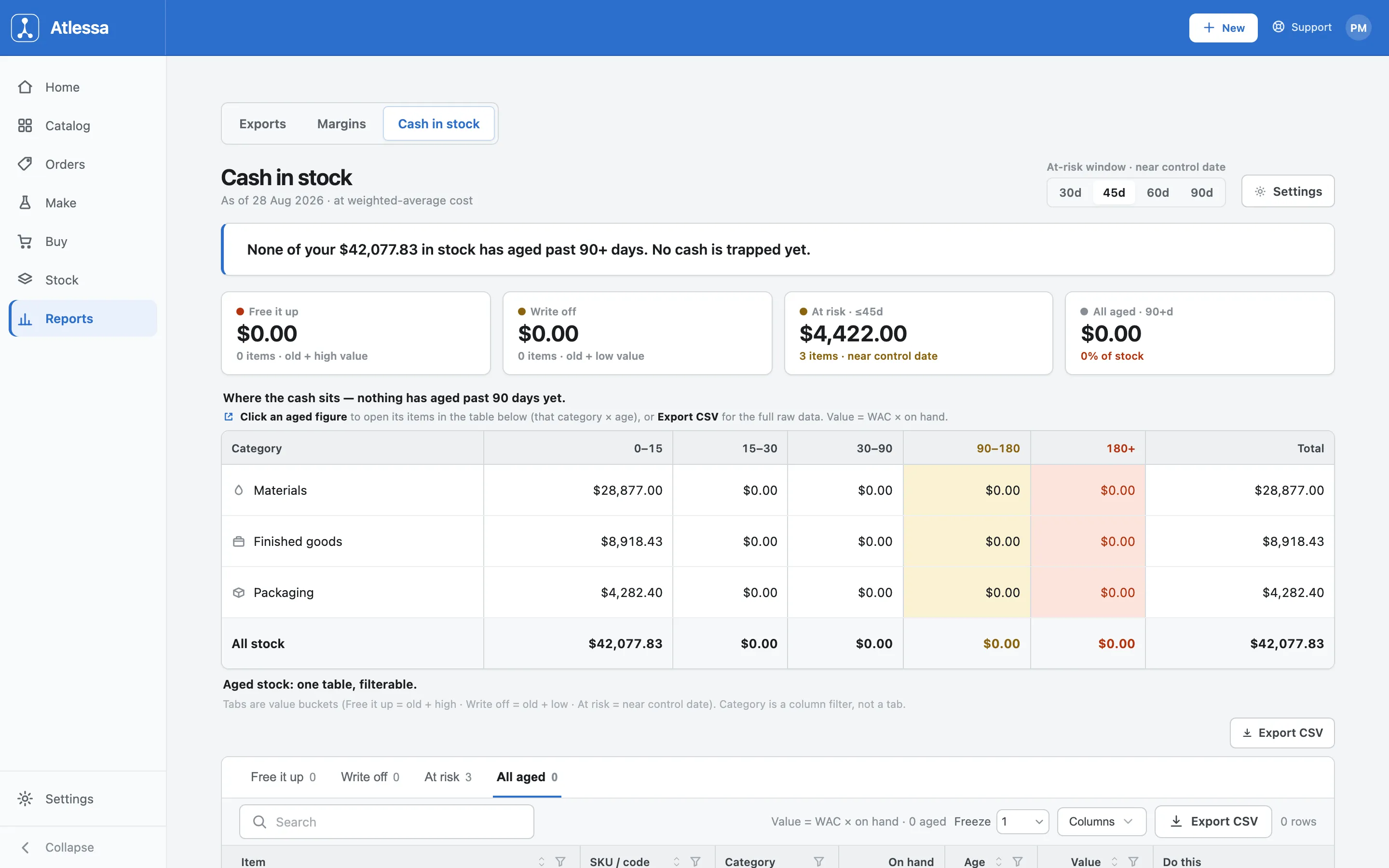
Cash in stock: total value at WAC, the four triage cards, and the category-by-age matrix, with a banner confirming none of it has aged past 90 days. - Read where the cash sits.
Four summary cards triage your money at a glance:
- Free it up ($0.00, 0 items): old and high value, cash worth chasing.
- Write off ($0.00, 0 items): old and low value, probably a loss to clear.
- At risk, <=45d ($4,422.00, 3 items): near a control date, the units to move next.
- All aged, 90+d ($0.00, 0% of stock): everything past its prime.
Here only the at-risk card carries a figure, so nothing has gone stale and the only thing to watch is three items approaching their control date.
Below the cards, "Where the cash sits" breaks the same total down by category and age. The table, "Aged stock value by category and age band," has columns Category, 0-15, 15-30, 30-90, 90-180, 180+, Total, with rows Materials ($28,877.00), Finished goods ($8,918.43), Packaging ($4,282.40), and All stock ($42,077.83). An item lands in a band by its oldest on-hand lot, so this is your cash split two ways: down by category, across by how long it has sat. Every figure here sits in the 0-15 band, so all the cash is fresh, and rows and columns both add back to $42,077.83.
- Act on the at-risk and aged stock.
To see the exact items, scroll to the item table. It is one filterable table, not separate reports. The tabs are the value buckets (Free it up, Write off, At risk, All aged); Category is a column filter, not a tab. Open a bucket, or click any aged figure in the matrix above, and the table shows just those items.
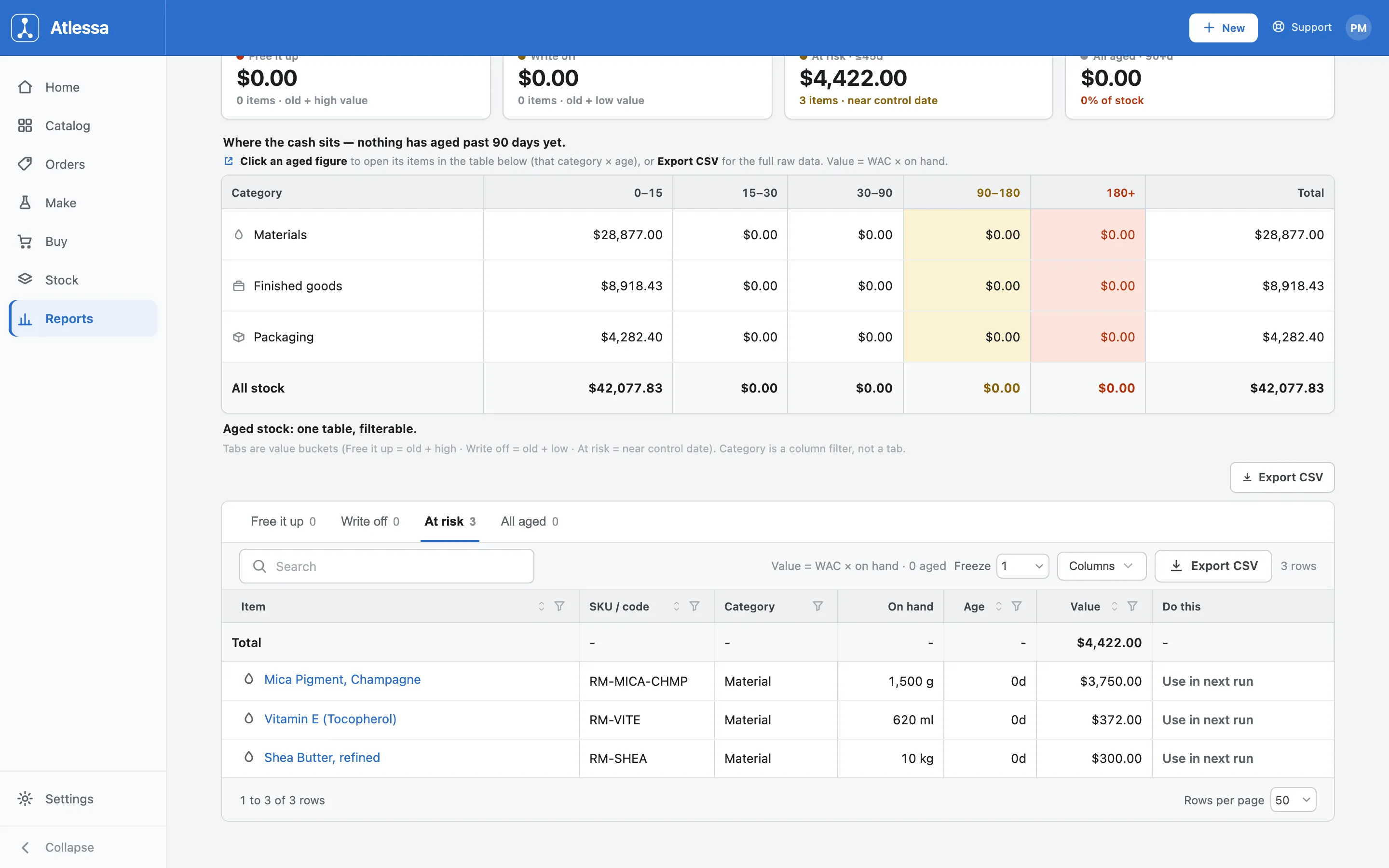
The filterable item table with the At-risk bucket selected: three materials near their control date, each with a suggested action and a total of $4,422.00. With At risk selected (Free it up 0, Write off 0, At risk 3, All aged 0), the table lists them by Item, SKU / code, Category, On hand, Age, Value, and Do this:
- Mica Pigment, Champagne (RM-MICA-CHMP, Material, 1,500 g, 0d, $3,750.00).
- Vitamin E (Tocopherol) (RM-VITE, Material, 620 ml, 0d, $372.00).
- Shea Butter, refined (RM-SHEA, Material, 10 kg, 0d, $300.00).
Total $4,422.00. The Age reads 0d while these still count as at risk: fresh lots, but close to their control date (age and at-risk are separate cuts; below). Each row's suggested action depends on category; all three are materials, so each reads "Use in next run". To see the exact lots, open an item and trace the lot. Export to CSV to work through it or hand it on.
- Tune the at-risk window so it matches your stock.
"At risk" is driven by the control date and how far ahead you look. The "At-risk window, near control date" control sets that horizon (30d, 45d, 60d, 90d); widening it catches stock sooner, narrowing it focuses on what is close (mechanics below). A Settings link sits beside it, and these thresholds are yours:
- At-risk window: 30, 45, 60, or 90 days (default 45).
- Aged cutoff for old stock (default 90 days).
- High-value split separating Free it up from Write off (default $500).
None of the buckets are fixed; the numbers here are just the defaults. Control dates and their lot states are part of the batch and lot model; see How batches and lots work for how a lot earns its control date and moves through Approaching, Flagged, and Lapsed.
How the numbers are worked out
The valuation. Each item is valued at WAC times on hand: weighted average cost times the quantity you hold, summed for the headline total. It is a read as of today, not a forecast or a fresh costing. Atlessa recomputes nothing here; it composes the inventory read you already have (one row per item, carrying its WAC value, on-hand quantity, kind, category, and SKU) with the lot balances and dates behind each item. So $42,077.83 is exactly what the same items are worth in Stock, arranged for triage.
Where age comes from. An item's age is the age of its oldest on-hand lot, the earliest batch you still hold, not an average and not the last receipt. The report drops each item's value into a band by that date (0-15, 15-30, 30-90, 90-180, 180+). The category-by-age matrix is that value split two ways, down by category (Materials, Finished goods, Packaging) and across by band. Every row adds to its category total, every column to its band, and the whole matrix reconciles to $42,077.83. Nothing is double-counted or dropped: the matrix is the total, rearranged.
How at risk differs from aged. At risk is a different cut of the same stock, driven not by age but by each item's nearest on-hand control date, the soonest best-by or use-by across your lots, measured against the window you set. An item is at risk when that date falls inside the window. So the two views disagree on purpose:
- A material can be at risk while in the fresh 0-15 band (bought last week, close to its use-by).
- Old stock can sit past 90 days and never be at risk (well within its control date, or with none).
Control dates and lot states are part of the batch and lot model; see How batches and lots work.
How the buckets derive. The cards and tabs are cuts of those two signals:
- Free it up: old and high value, worth enough that freeing the cash is worth chasing.
- Write off: old and low value, tying up so little that clearing it off the books is likelier.
- At risk: the control-date cut, stock inside your window that may lapse before it sells.
- All aged: the full pool 90+ days old.
These are not disjoint piles: age and at-risk are independent cuts, so an item can be both At risk and Free it up, or both At risk and Write off. Category is not a bucket, just a column filter, so you can narrow any bucket to Materials, Finished goods, or Packaging. Each item's action depends on category: a finished good gets a Reprice in Shopify deep link (the same one Margins uses), a material gets Use in next run (an internal plan link), packaging gets Reorder less (plain text, no link). Only the finished-goods action is a Shopify deep link. The whole list exports to CSV.
Common questions
- Why does a healthy shop show $0 trapped?
- Because nothing has aged. When all your stock sits in the 0-15 band and none has passed 90 days, there is no trapped cash, so Free it up, Write off, and All aged read $0.00 and the banner confirms it. That is the good case, not an error. The report only fills those buckets as stock ages.
If it is not working
- The total looks higher or lower than I expected.
- The headline is your total stock value at WAC, so it moves with both your stock average and your quantities. A figure that looks off usually traces to a recent receipt that shifted your WAC, or to quantities that are not what you thought. Check your latest receipts and on-hand counts in Stock, and it will reconcile.
- An item I expected is not at risk.
- At risk is driven by the nearest control date and the window, not by age. If an item is missing, its nearest control date is likely further out than your window, or it has none. Widen the window (up to 90 days), or check the item's control date in Stock.