Make a batch
A production run turns materials into finished stock. You pick what to make, move the run to production so Atlessa draws the exact material lots into work in progress, then close it to record what you used and made. Closing mints a new finished lot, sets the real cost per unit, and folds the finished goods into on-hand stock, traceable back to every material lot.
- Run (ref RUN-N): the plan, what you are making and how many. Each run holds one or more batches (ref RUN-N-A), the physical run you move to production and close.
- Buildable: how many units you can make from materials on hand. The limiting component is the one material that caps that number.
- Pending demand: order units you owe but have not made.
- Move a draft to production: commit it, drawing materials from stock (by FEFO: earliest control date first, oldest lot when an item has none, tagged First out) into work in progress (WIP).
- Close: record the actuals. This mints a new finished lot and sets the actual cost per unit and gross margin.
- Staged value: the planned cost of the materials a run will draw, before it closes.
Steps
- Decide what to make. In Make, read Buildable and Pending demand.
Make opens on a sub-nav: Runs, Batches, BOMs, and Buildable. The Runs tab lists production runs, the materials each uses, and what it puts into stock. Two reads guide you:
- Pending demand (top of Runs): the variants your orders owe but you have not made, with units pending and how many orders. Volumising Mascara 53 pcs from 1 order; Rose Lip Tint 38 pcs from 1 order. Each has a Start a run action.
- The runs grid (below): each run by state, target, produced, and staged value, across Open, Drafts, Closed, and All tabs.
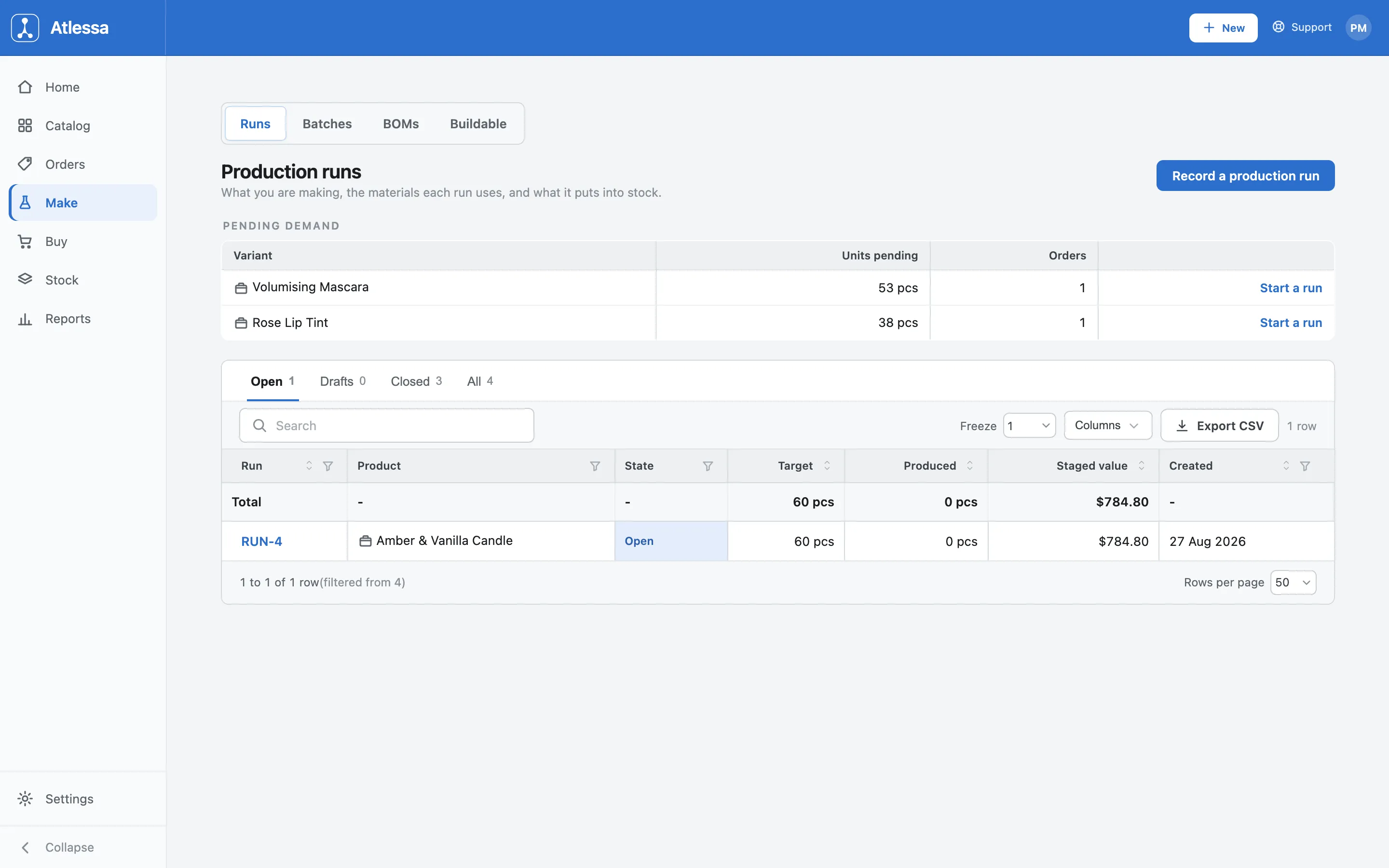
The Runs tab: Pending demand up top, and the runs grid below by state, target, produced, and staged value. The Buildable tab answers the other half: how many of each product you can make now from materials on hand. Each row shows the count and its limiting component, the material that runs out first and caps the number: Amber & Vanilla Candle 193 pcs, limited by Amber & Vanilla Fragrance; Berry Lip Tint 282 pcs, limited by Jojoba Oil. Buildable is what you can make; pending demand what you need to. Either row has a Start a run.
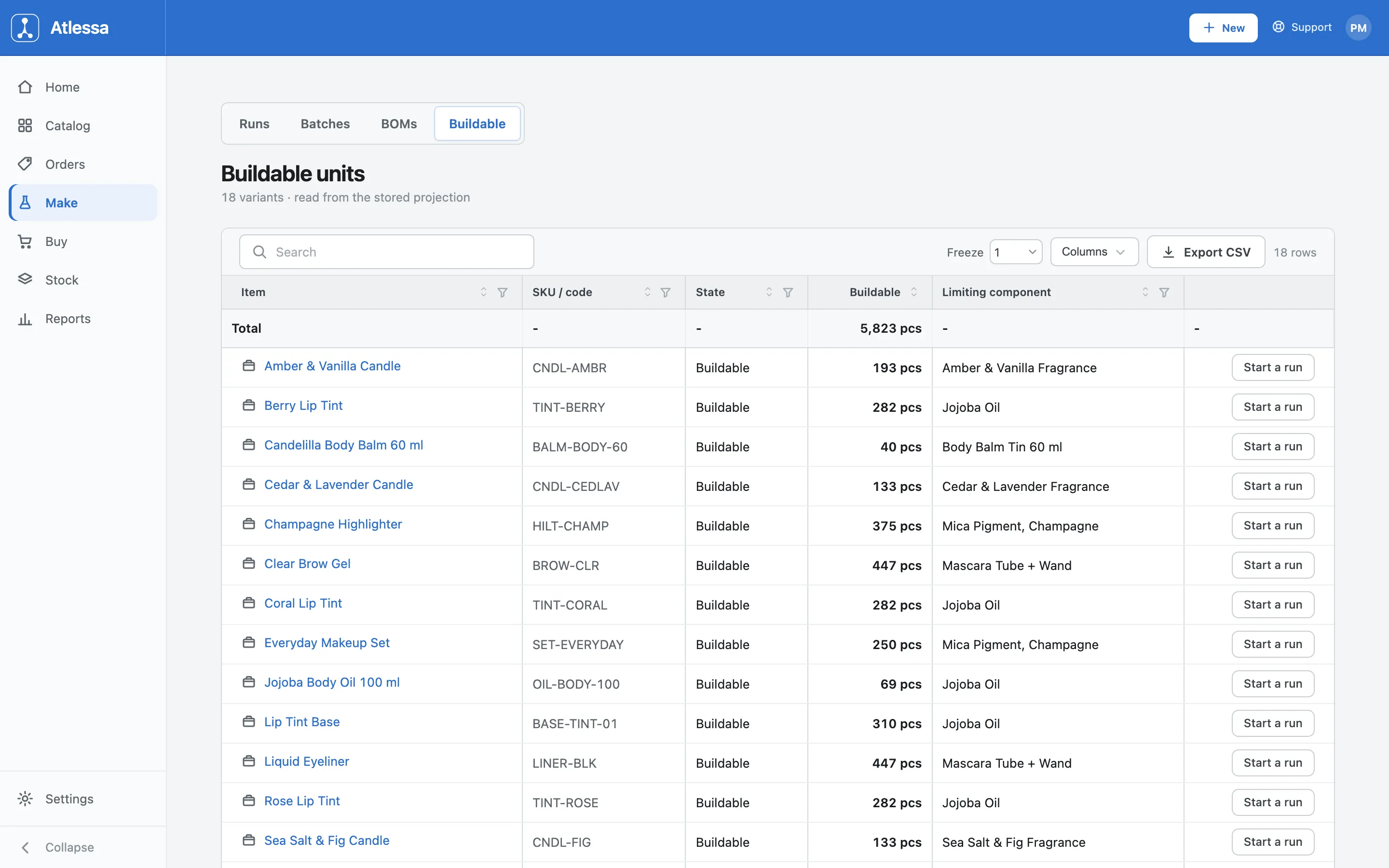
The Buildable tab: how many of each product you can make now, and the limiting component capping each count. - Start a run: pick what you are making and how many.
New production run (from Record a production run, or a Start a run action) is where you pick what and how many. Two modes sit at the top:
- From pending demand prefills the products and quantities your orders owe (here 91 units across 2 orders).
- Empty run starts blank.
Each product row has a quantity field and a live buildable read: Buildable: 447, enough on hand under Volumising Mascara, Buildable: 282 under Rose Lip Tint. Use + Add another product to make several at once.
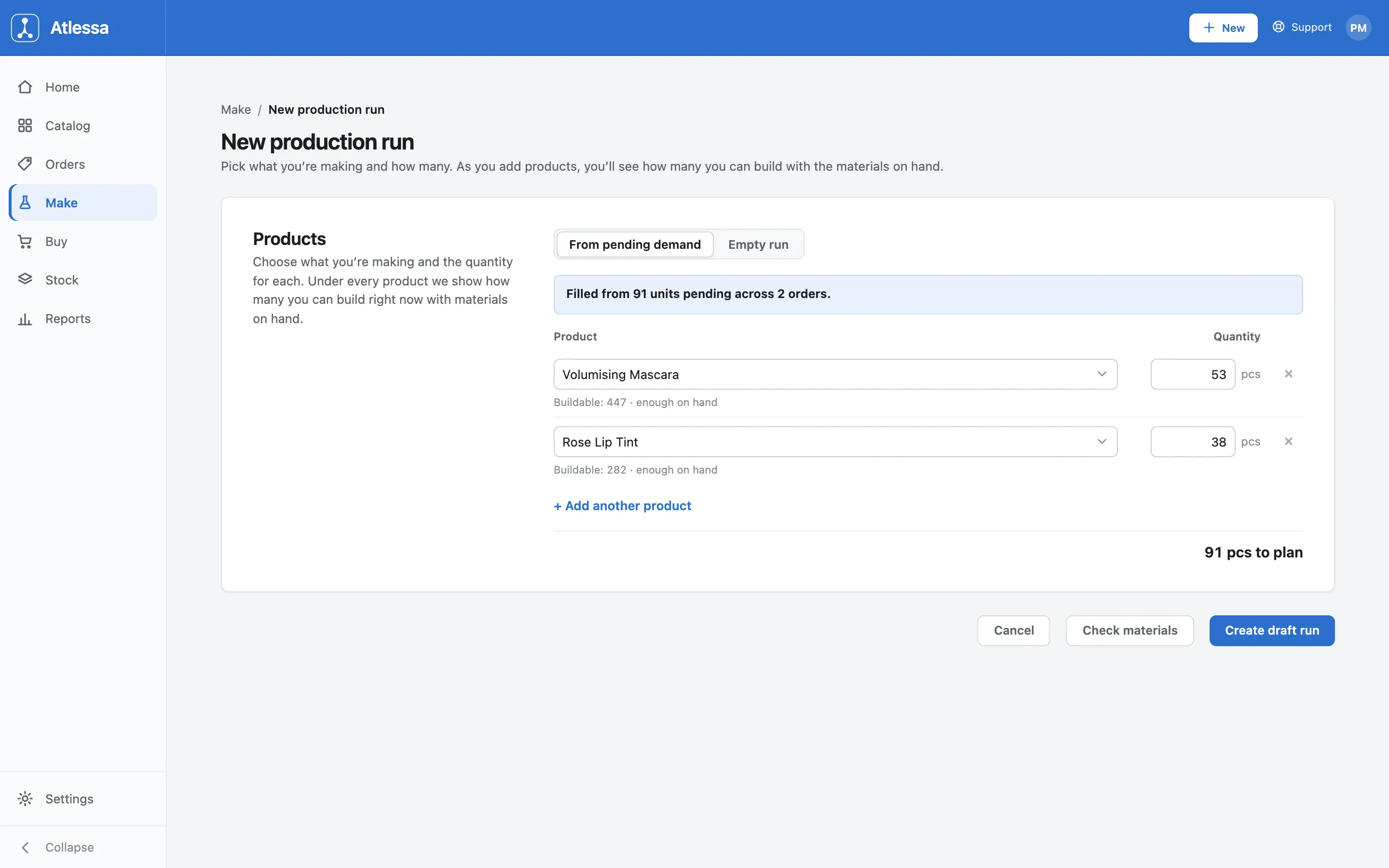
New production run: from pending demand or empty, each product showing its buildable count and enough on hand. The footer totals the plan (91 pcs here) and offers Cancel, Check materials (confirms components against stock before you commit), and Create draft run (saves it as a draft you move to production next).
- Move the run to production to draw the materials in.
Move to production commits the draft: Atlessa draws each component from stock and the batch moves to In production. The batch view (RUN-4-A from RUN-4) shows the products staged and a Materials table of exactly what was drawn, per lot. It draws by FEFO:
- The lot with the earliest control date goes first.
- When an item has no control date, the oldest lot goes first (FIFO).
- The drawn lot is tagged First out: Coconut-Soy Wax from RCV-0005, the fragrance from RCV-0018, each with its control date. A newer lot with an earlier best-by is drawn before an older one.
Those materials are now committed to work in progress: out of available stock, not yet finished.
A clean run advances in one click, no dialog. But if the draw would touch a lapsed lot, or you click Choose lots to override, a per-material picker opens to confirm or change which lot each component draws from. Picking a hard-lapsed lot asks for a reason (from a fixed list, for example Approved by QA or Sample or test batch) and a mandatory note before it will commit.
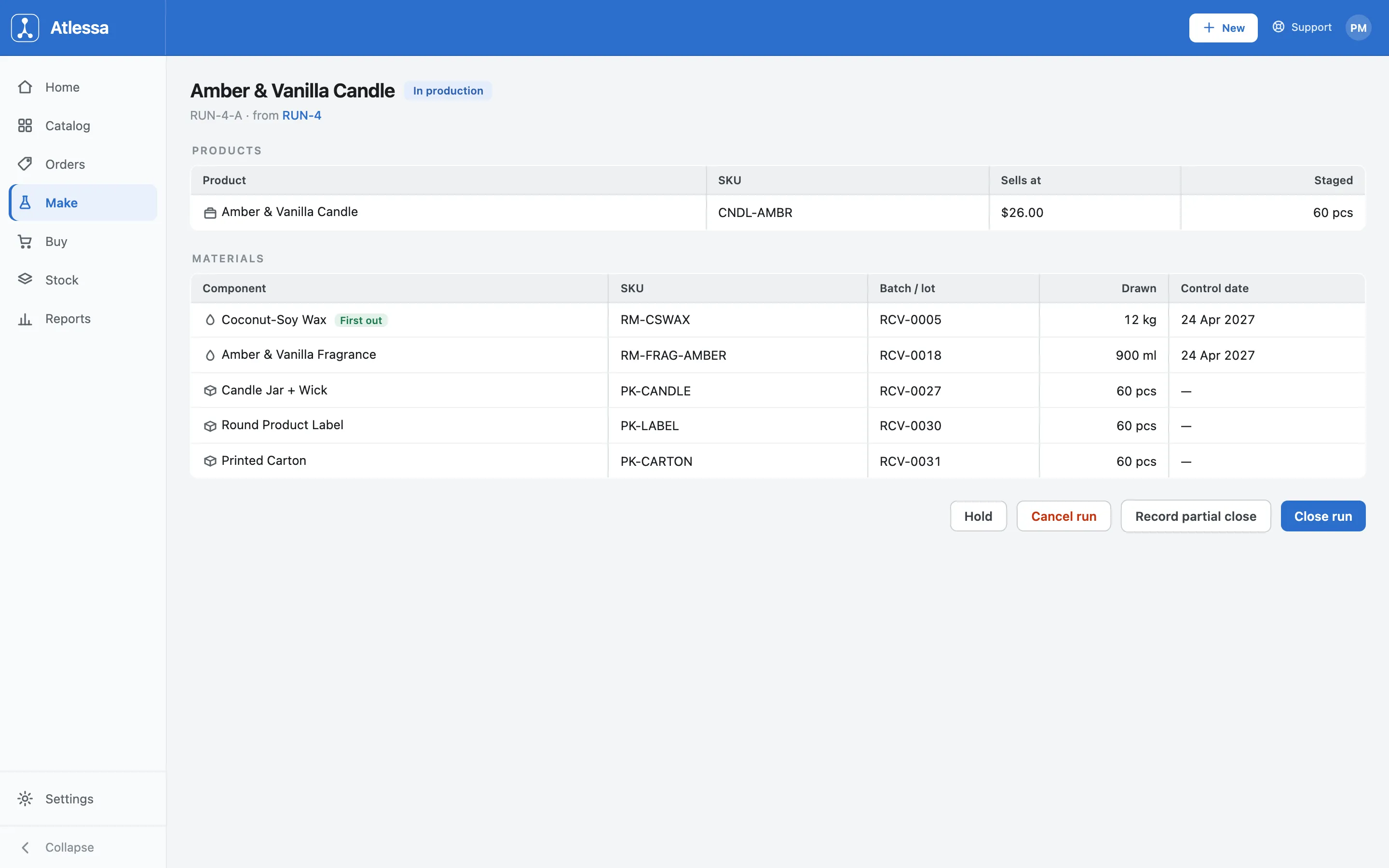
A run In production: the products staged, and the materials drawn per FEFO lot (tagged First out) into work in progress. From here the actions are Hold, Cancel run, Record partial close, and Close run. Closing is next; the rest are in the callout below.
- Close the run: record what you used and made.
Close run records the actuals, prefilled from the plan so you only edit what changed. Two sections:
- What you used: each component with what was taken (per lot, for example Taken per lot RCV-0005 12 kg). You type only Used and Back to stock. Wasted is not editable; Atlessa derives it as taken minus used minus back to stock (floored at 0).
- What you made: the whole units made against target, an optional control date, and an Available from date (blank sells the lot now; set a date to hold it for a cure or set time). It names the lot it will mint (New lot will be PRDC-0004) and shows the realized yield as you edit (100% when made equals target).
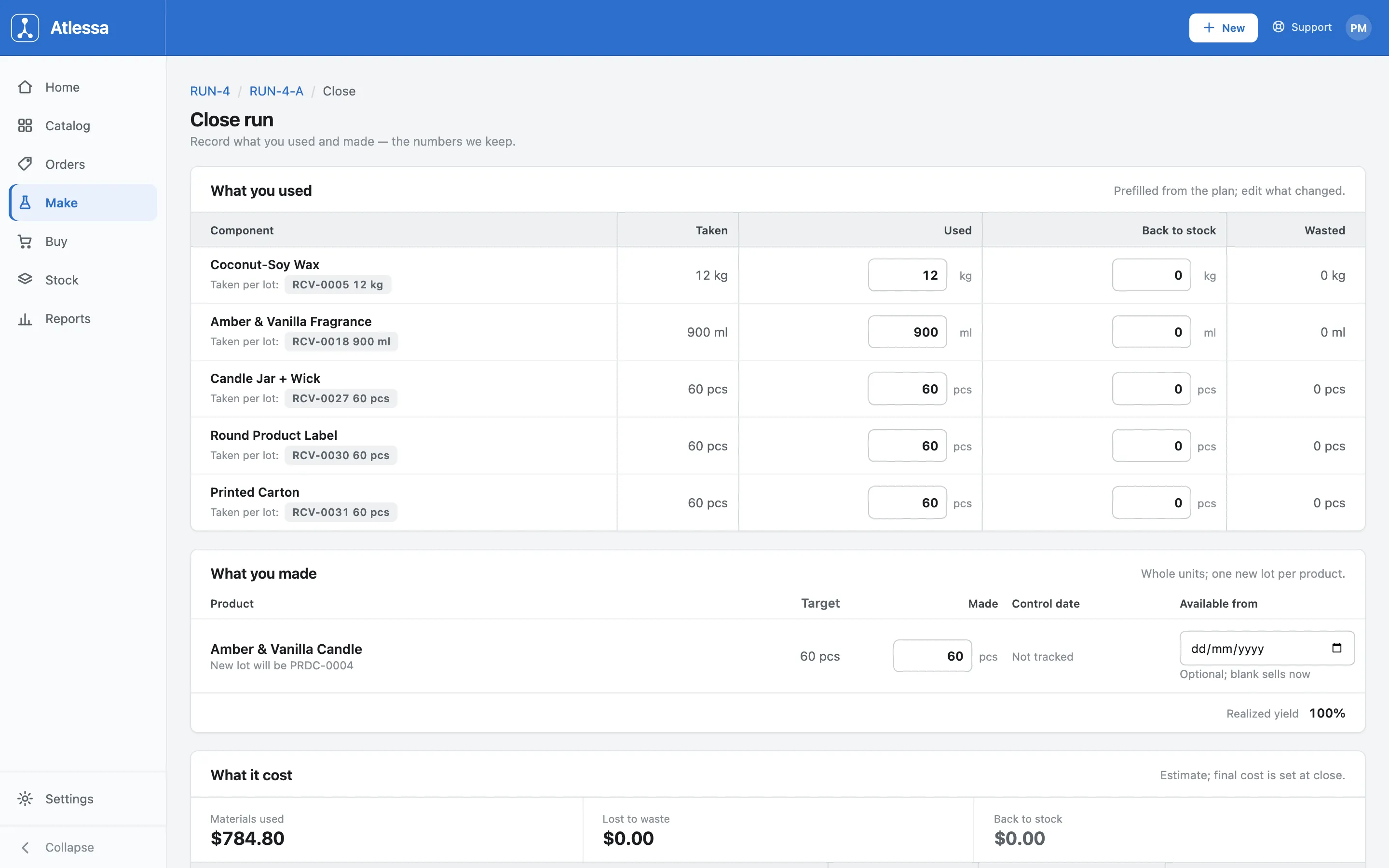
Close run: What you used (wasted is derived), What you made (whole units, one new lot per product, realized yield), and the cost so far. The What it cost panel totals materials used, lost to waste, and back to stock as an estimate; the final cost is set at close. Close the run to finish it, or Record partial close to bank part of it for now.
- Done: the finished lot is minted and costed.
A closed batch (Rose Lip Tint, RUN-2-A from RUN-2) is the outcome. The finished goods are on hand as a newly minted lot (Lot minted PRDC-0002), and the run locks in:
- Actual cost per unit $6.99, Total cost $838.80, Gross margin 61%.
- The Materials table now reads Drawn, Consumed, Scrapped, and Returned per lot (Jojoba Oil from RCV-0001, tagged First out, 0.6 kg drawn and consumed), so the exact lots are recorded for trace.
Actions are All production runs, Duplicate this run to repeat the recipe and quantities, and Export.
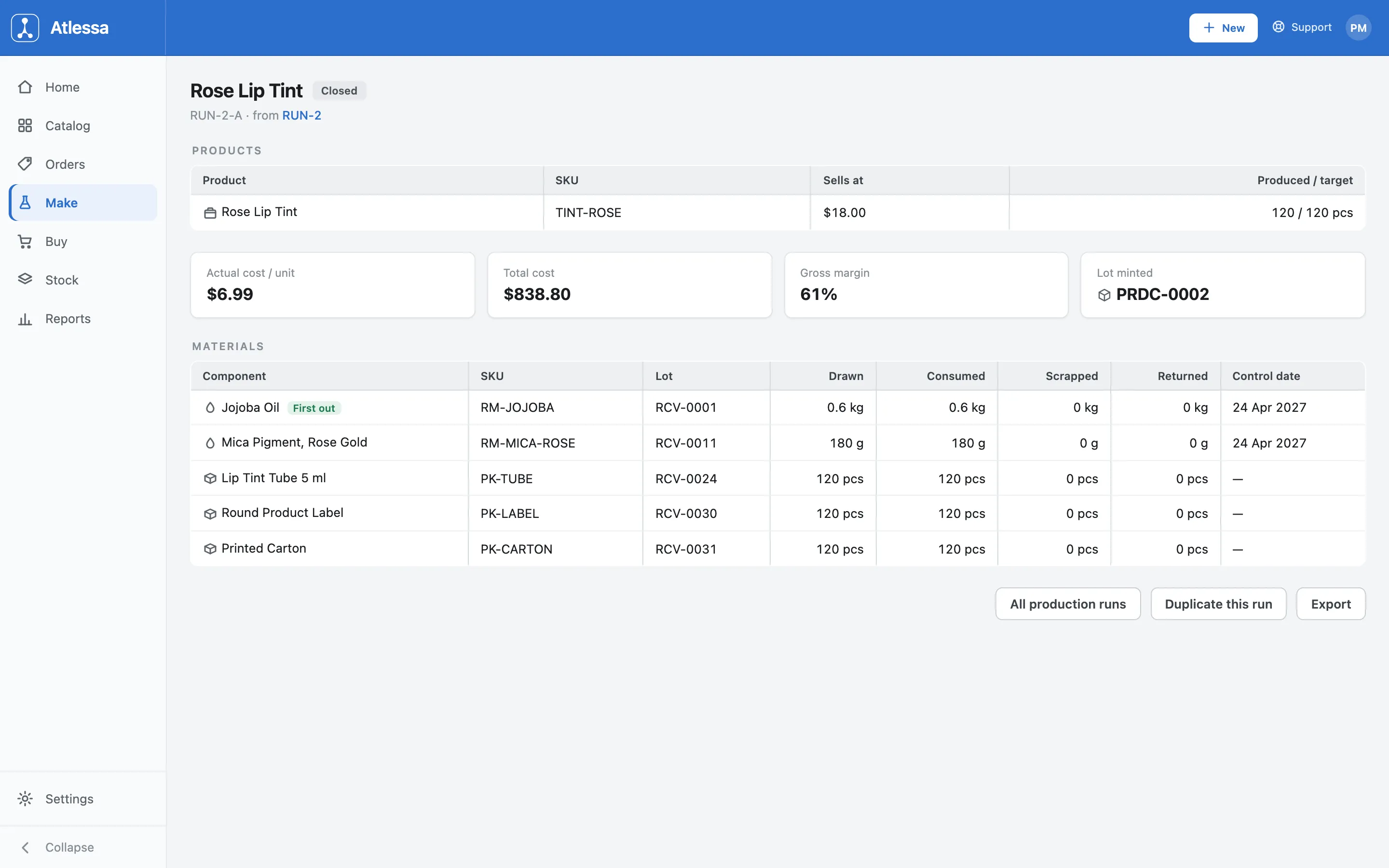
A closed batch: finished goods at their actual cost per unit and gross margin, the new lot minted, and the exact lots consumed.
- Record partial close: banks the units made so far (minting their lot, consuming their share of materials) while the run stays open, the rest still in WIP. Close it fully later.
- Hold: pause without unwinding. A held run has a Resume.
- Cancel run: stop it and return the drawn materials to stock. Allowed only while nothing has been produced; once you record any partial close, the run can only finish as Closed, not Cancelled.
Common questions
- What is the difference between Buildable and Pending demand?
- Buildable is supply: how many of a product you can make now from materials on hand. Pending demand is demand: how many units your orders owe but you have not made. Together they tell you what to make (demand) and whether you can (supply). Both have a Start a run action.
- What does "limiting component" mean?
- The one material that runs out first for a product, so it caps how many you can build. If Berry Lip Tint is buildable 282 and limited by Jojoba Oil, oil runs dry at 282 units; receiving more of it (and nothing else) raises the count.
- What does Move to production do?
- It commits the draft, draws the materials from stock into work in progress, moves the batch to In production, and shows the exact lots and quantities it took. Those materials leave available stock at that moment, but nothing is finished until you close.
- How does Atlessa decide which lot to draw?
- By FEFO (first expiry, first out): the lot with the earliest control date first, and the oldest lot when an item has no control date, tagged First out. The batch records precisely which lots it drew, so a finished lot traces straight back to its materials. The full rule is in How batches and lots work.
- What is the difference between staged value and actual cost?
- Staged value is the planned cost of the materials a run will draw, shown while it is open, an estimate. Actual cost per unit is set at close, from what you recorded as used, made, and wasted. Cost is only final at close, which is why the close form calls its panel an estimate.
- How do waste, scrapped, and returned affect the cost?
- At close you enter, per material, how much you used and how much went back to stock; Atlessa derives waste as the remainder (taken minus used minus back to stock, floored at 0). Returned material comes out of the run's cost; the derived waste stays in it (consumed even though it made nothing). So sending less back raises the cost per unit, returning more lowers it. That is why the close form has you account for what was taken.
- Can I change a run after it is closed?
- No. A closed run is a finished record, like a receipt: the lot is minted and the cost locked. If something was wrong, correct it with a new movement (an adjustment in Stock, or another run) rather than editing the closed one, so the trace and audit trail stay intact. To repeat a run, use Duplicate this run.
If it is not working
- I cannot move a run to production, a material is short.
- A draft only moves when every component has enough stock to draw. Check the flagged material (the limiting component on the Buildable tab), receive more of it, or make the component first if you produce it, then move it to production. If the product has no bill of materials at all, it cannot run until you add one: open Catalog, then BOMs. See Bills of materials.
- The finished cost looks off.
- Actual cost is set at close from exactly what you recorded: materials used, units made, and anything wasted. If the cost per unit looks high, check the What you used figures (waste stays in the cost, stock returned comes out) and that made matches what you produced. The staged value you saw while open was only an estimate.
- Realized yield is under 100%.
- You made fewer units than target, or recorded some material as wasted, so the run turned less finished stock out of its materials than planned. That is fine to record; it just spreads the cost per unit over fewer units. Check the made quantity and the Wasted column match what really happened.