Trace a lot
Every lot carries its whole story: where it came from, every batch it went into, and every order it reached. Trace turns a lot code into that story in a couple of clicks. It is what a recall, a customer query, or an audit runs on.
- Lot: a traceable quantity of one item from one event, like a delivery or a production run.
- Lot journey: the chain linking a received material lot to the run it was made into and the orders it shipped in.
- Exact: a link confirmed by a lot assignment at pack time. Estimate: inferred from the first-out rule when no assignment was recorded.
- Split: a child lot carved off a parent, carrying the parent's physical material. Branch: another run that drew from the same physical lot.
Trace rests on the lot model itself, so if buckets, minting, control-date states, FEFO, and genealogy are new to you, read How batches and lots work first: this article assumes it.
Steps
- Find a lot to trace. Go to Stock, then the Lot trace tab.
Lot trace searches four ways, so you can start from whatever you have:
- By lot code (an internal code like RCV-0001).
- By material and date range (the item, and roughly when it arrived).
- By supplier batch (the code your supplier printed on the delivery).
- By order ID (start from a customer order, find the lots that shipped in it).
All four land on the same board. Every result is read-only, so nothing here moves stock or changes an order.
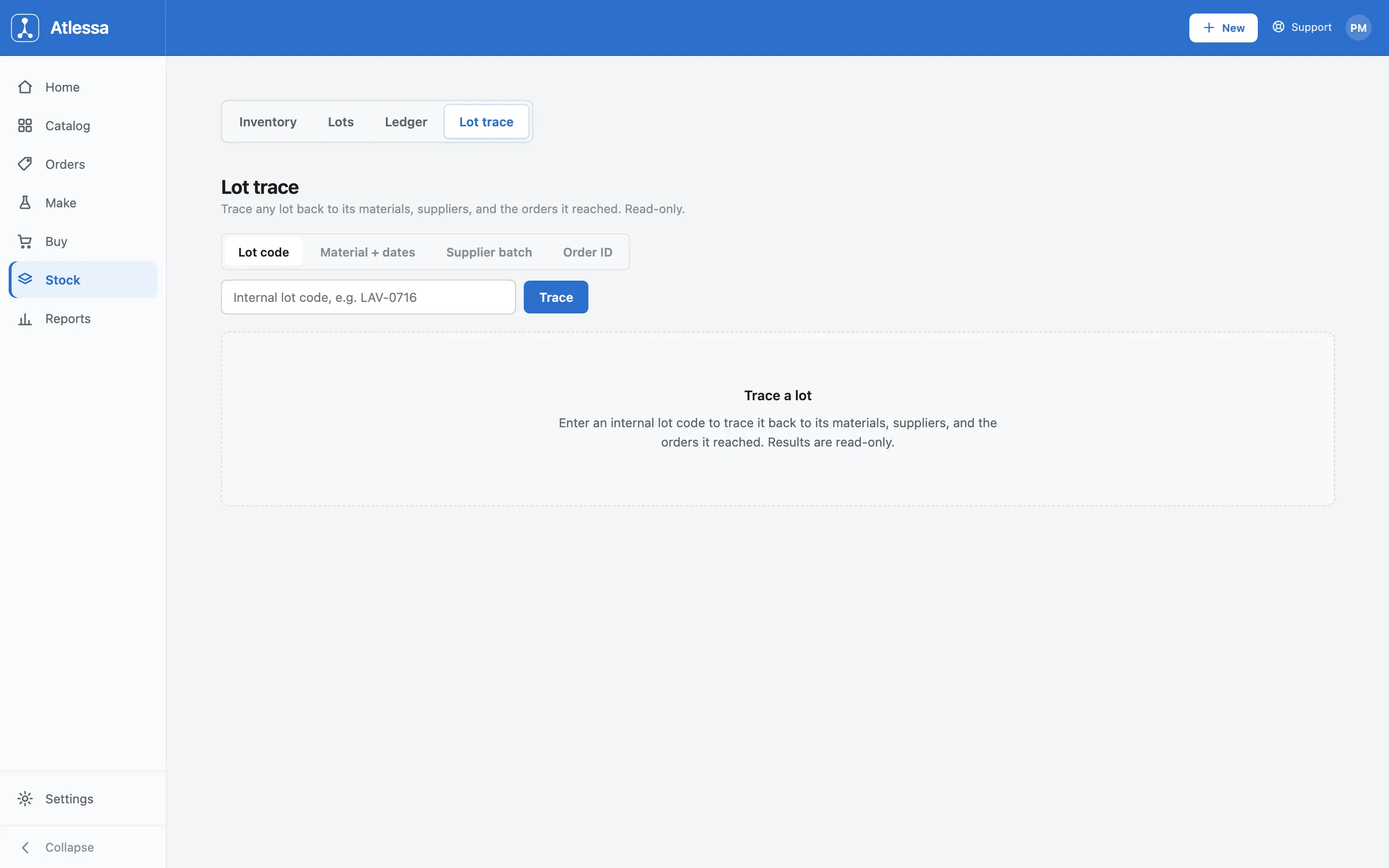
The Lot trace search: four ways in, by lot code, by material and dates, by supplier batch, or by order ID. To browse instead, the Lots tab lists every batch in stock across all items, with its status against its control date (In stock, Approaching, Flagged, Lapsed, Not yet available, Quarantined). Filter by status, then open any code. Any lot code anywhere in Atlessa is also a link straight into its board.
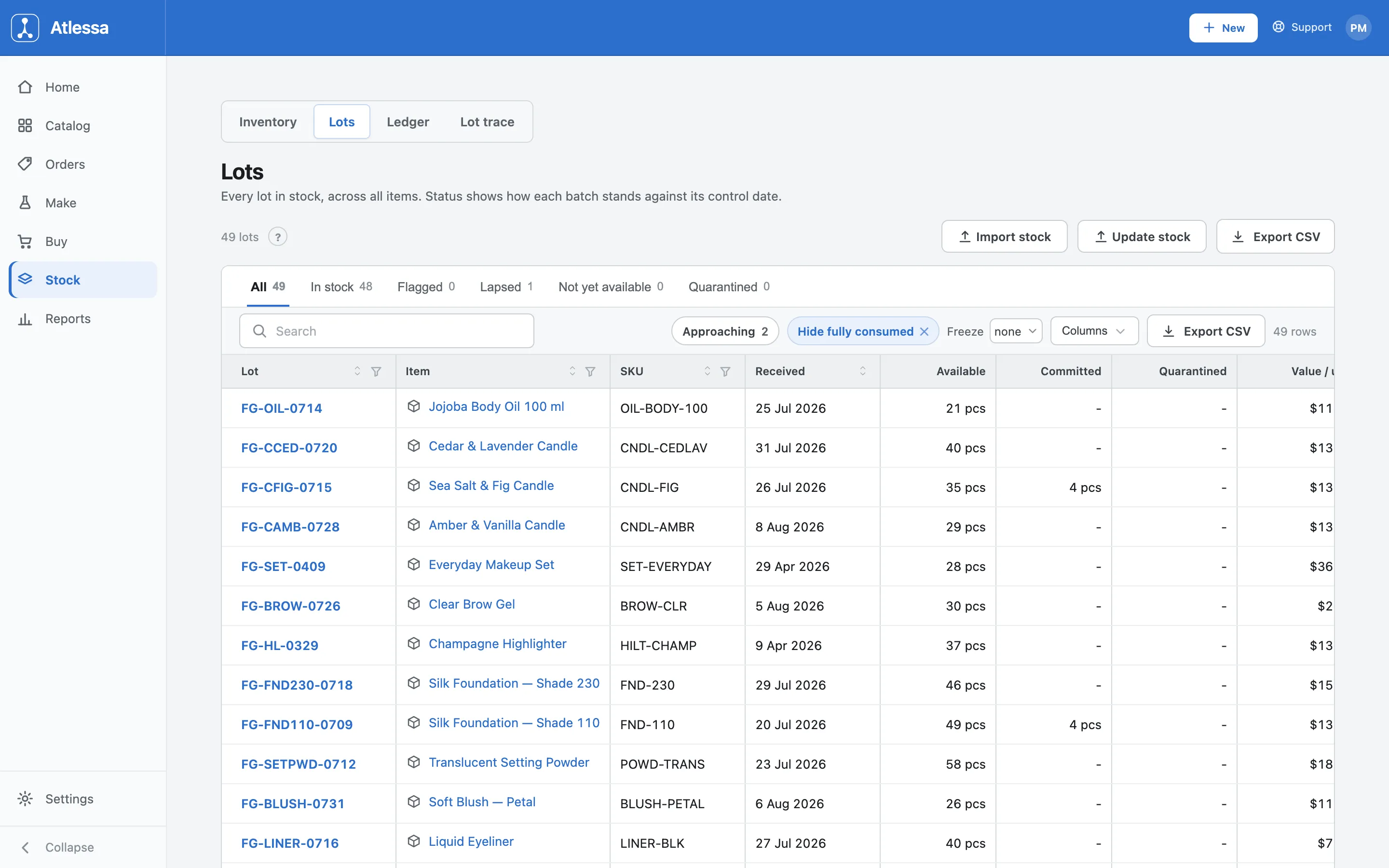
The Lots list: every batch in stock, its received date, what is available and committed, and its status. - Read the lot journey forward.
The board reads left to right: Receiving, Production, Made lots, Orders. Atlessa builds it from those four records, so for a material lot like a jojoba oil delivery you see every run that drew from it, every finished lot those runs produced, and every order those finished lots reached. Each node's count is how many orders it reached, and each order is tagged Exact or Estimate.
The lot header is where an investigation starts. It shows the supplier code, received date, what is left, the landed cost, the best-by date, and the In-stock state against the control date. It also carries a Hold in quarantine action: it keeps the stock on your books but stops it being drawn into any new run or order, which is what you want the moment you suspect a lot and need to freeze it mid-trace.
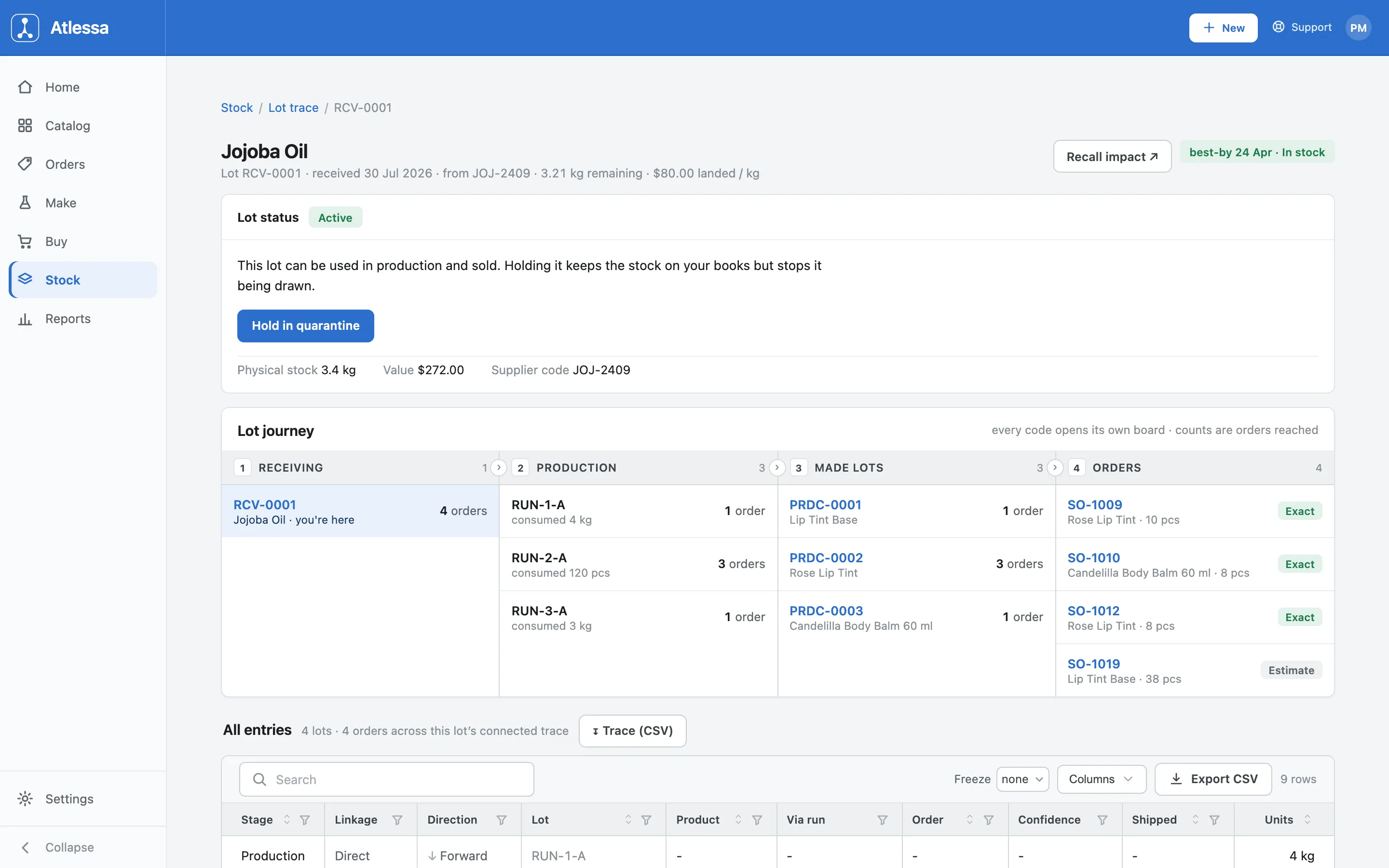
Forward trace of a jojoba oil lot: three production runs, three made lots, and four orders reached, each tagged Exact or Estimate. How to read the tags. Which tag an order wears depends on how the link was recorded:
- A material lot's link to an order is Exact: it comes straight from the order's lot-bound reservations, so it reflects what each order actually drew.
- A finished lot's link is by default an Estimate, inferred by the first-out rule (earliest control date first, or oldest when there is none), because nothing recorded which finished lot shipped in which order. Assigning lots at pack time upgrades that one order's link to Exact; orders with no assignment stay Estimate.
The full model is in How batches and lots work.
The full trace follows splits and branches, not just the straight line. If a lot was split, the board follows each split child forward, because a split child carries the parent's physical material, so its orders are the parent's reach too. It also follows branches: other runs that consumed the same physical lot, and where those runs went. So it answers "which other runs used this same material," not only the direct line from this code. Every code on the board, split child or branch run, is a link that opens its own board.
- Read it backward from a finished lot.
Open a finished batch instead, like a Rose Lip Tint run, and the same board runs the other way. Receiving now lists every raw material lot that went into that batch, and Orders shows where it shipped. So you can start at a delivery and go forward to customers, or start at a finished batch and go back to its materials. The direction just decides which end of the same recorded chain you read from. Every code opens its own board, so you can pivot mid-trace: land on a material lot from a finished batch, then trace it forward to every other batch it touched.
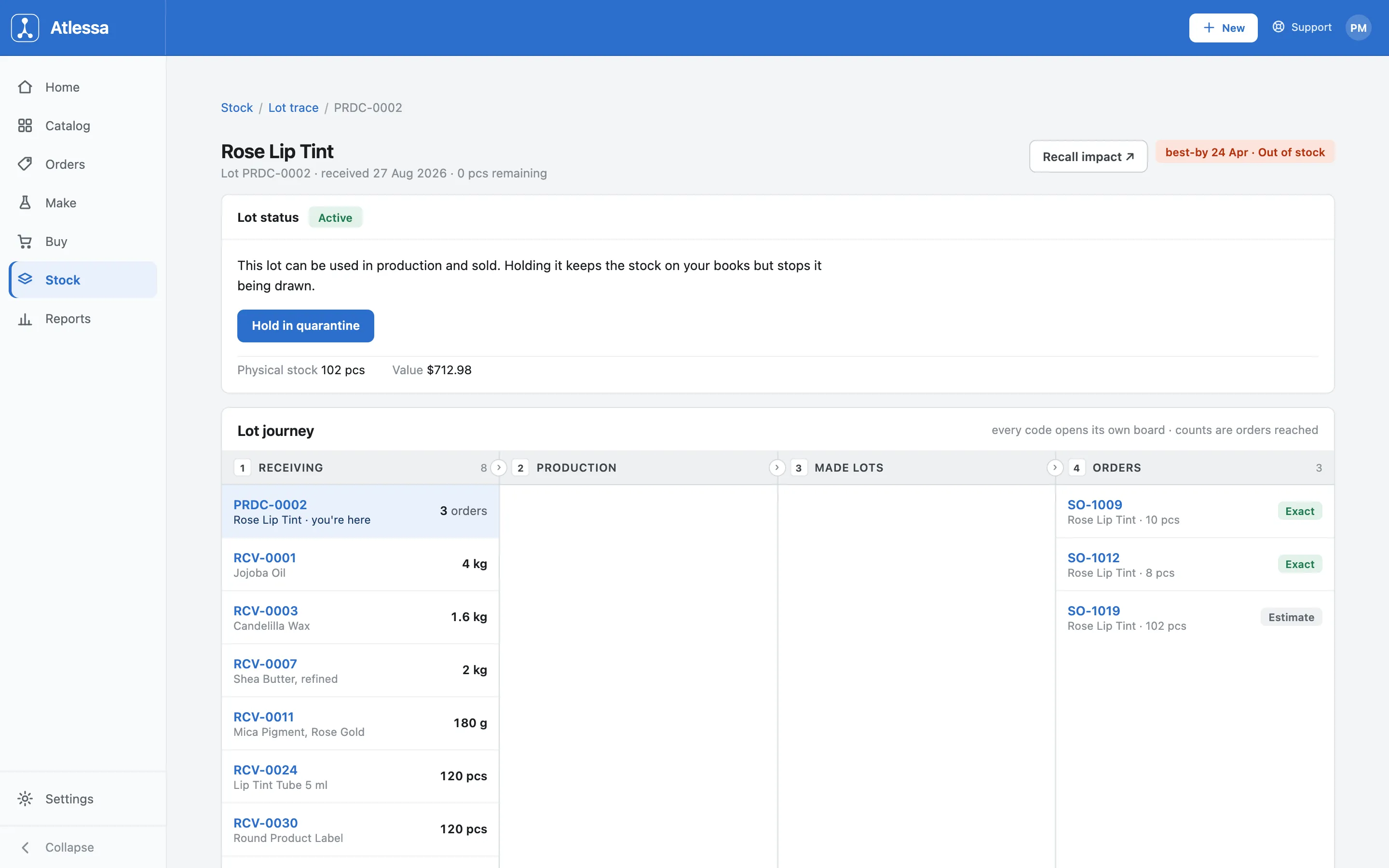
Backward trace of a finished Rose Lip Tint lot: the material lots that fed it on the left, the orders it reached on the right. - Run a recall.
Click Recall impact for the action list: every order to notify, tiered by confidence, with units and value shipped, and totals at the top (orders to notify, units shipped, value shipped, and what is still on hand or already scrapped). The three tiers rank how the link was established:
- Exact: assign-confirmed at pack time.
- Estimate: inferred by the first-out rule.
- Possible: inside the lot's reach but on the edge of the window.
The pull list defaults to Exact plus Estimate, and the "orders to notify" total counts just those two, erring toward the safe over-set: including one you did not need is a wasted call, missing one is a shipped unit you never traced. The lowest-confidence Possible tier sits behind an opt-in Possible +N toggle: switch it on and those rows join the list, leave it off and they stay out of the count and the export. The confidence bar shows how much of the reach is assign-confirmed, so you see at a glance how much rests on records versus inference. Export the whole pull list as CSV.
If you held the lot in quarantine when you first opened its header, the totals already separate what is still on hand or scrapped from what shipped, so the list is only the units that actually left. Quarantine during the investigation keeps the remaining stock from being drawn into new orders while you build the list.
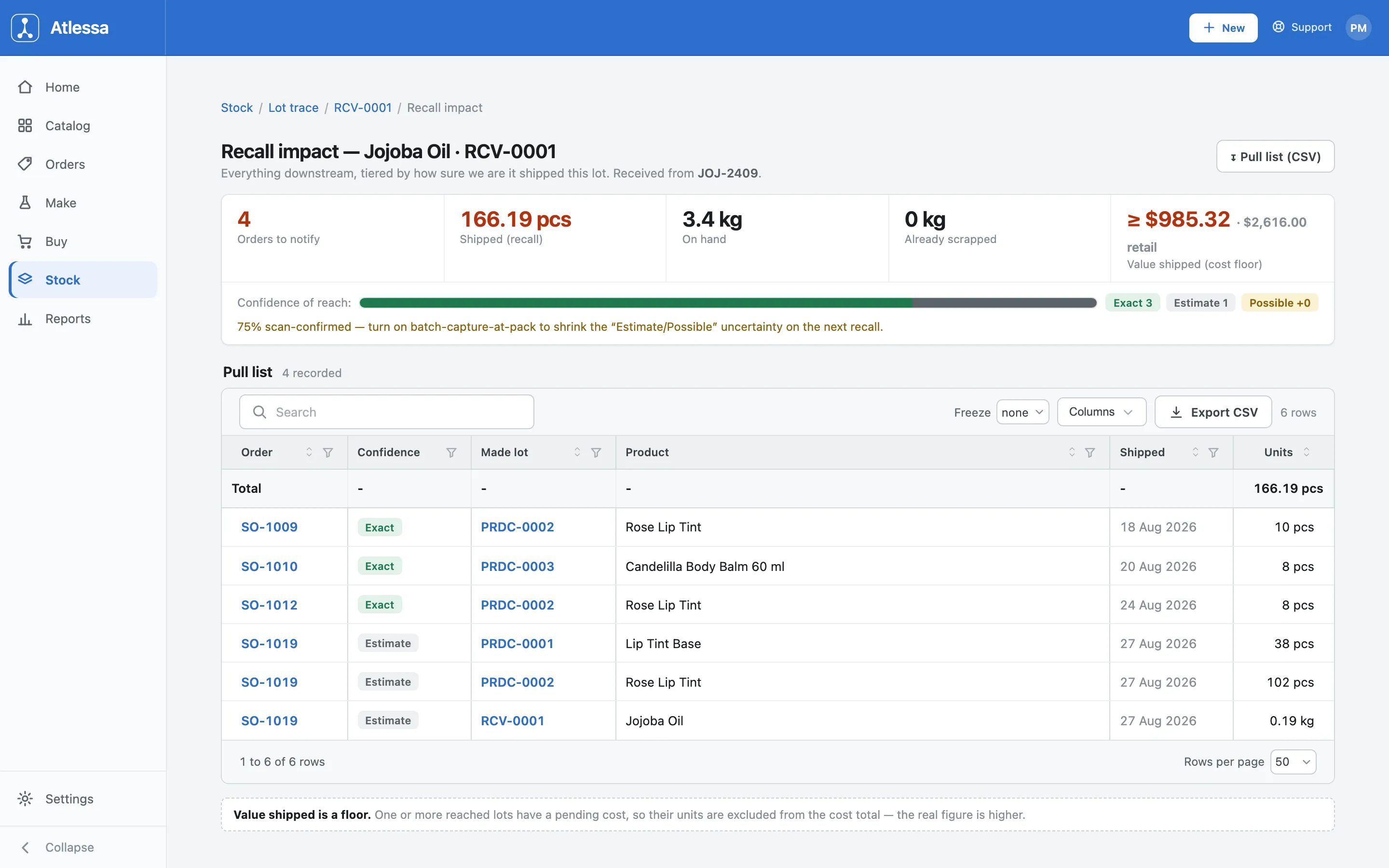
Recall impact: a flat pull list of affected orders, tiered by confidence, with units and value shipped and a CSV export.
Common questions
- What is the difference between Exact and Estimate?
- Exact means a lot assignment confirmed the lot on that order at pack time. Estimate means no assignment tied them, so Atlessa inferred the most likely lot by the first-out rule. Both are included in a recall; an Estimate is a safe over-set, not a missed order.
- How is a material lot's link to an order computed?
- From the order's lot-bound reservations, as a signed net per order and lot: quantity committed and consumed into that pairing, minus quantity returned or repointed away. A reserve-then-repoint nets to zero on the old lot and the full quantity on the new one; a consume-then-return nets to zero. So the material side is exact, reflecting what the order drew after every change.
- What upgrades an Estimate to Exact?
- A pack-capture link. Finished-lot-to-order links start as a date-window estimate from the first-out rule; assigning the lot at pack time (see Fulfil an order) records an assignment that upgrades that specific link to Exact. Orders with no assignment stay Estimate. So assign lots as each order is packed to turn future links Exact.
- How do I find the lots for one order?
- Use the Order ID search on the Lot trace tab, or open the order itself. Either way you get the lots that shipped in it, each tagged Exact or Estimate.
- I only have the supplier's batch code, not ours.
- Use the Supplier batch search on the Lot trace tab. Atlessa keeps the supplier code against the lot at receiving, so it maps back to your internal lot.
- What does Hold in quarantine do during a recall?
- It keeps the stock on your books but stops it being drawn into any new run or order or sold. Doing it the moment you suspect a lot freezes the remaining stock while you trace, so the totals cleanly separate what is still on hand or scrapped from what actually shipped.
- What are the recall confidence tiers?
- Exact orders were assign-confirmed at pack time, Estimate orders inferred by the first-out rule, Possible orders sit at the edge of the lot's window. The list defaults to Exact plus Estimate, which the "orders to notify" total counts; Possible is an opt-in you switch on with a "Possible +N" toggle, and only then do those rows join the list and export. The confidence bar shows how much of the reach is assign-confirmed.
- What does Recall impact add over the journey?
- A single flat pull list of every affected order with units, value, and confidence, ready to export, plus the totals you report: orders to notify, units and value shipped, and what is still on hand or scrapped.
If it is not working
- A link in the chain is missing.
- The journey only shows events Atlessa recorded. Stock imported without a receipt has no upstream link, and a batch not yet packed against an order shows a count only until an order attributes to it.
- An order I expected is not listed.
- Confirm the order actually consumed this item by opening it, and check the Lots list status tabs, since a lapsed or quarantined lot is handled differently. On a finished lot, Estimate links come from the first-out inference, so an order can sit under a neighbouring lot if that lot's window fit better.
- I cannot find a lot code.
- Search on the Lot trace tab, or open the lot from the Stock Lots list.