What Atlessa is
Atlessa is a manufacturing layer on top of Shopify for small-batch makers: cosmetics, candles, food, anyone who buys raw materials and makes what they sell. Shopify stays your storefront and your book of orders. Atlessa adds the making side Shopify does not model, so you always know what you can build, what it truly costs, and where every batch went.
Two halves that fit together
Shopify is the front of the house: it lists products, takes orders, ships parcels, and stays the system of record for all of it. Atlessa is the back: it tracks what you buy, what a product is made of, what you make, what each item really costs, and which orders every batch shipped in. The two stay in step because Atlessa reads your Shopify catalog and orders and writes true available stock back, so the number a customer sees is the number you can build.
The making loop
Everything in Atlessa is one loop, and the rest of this manual is one job per page around it. Home is that loop at a glance, and where Atlessa opens.
- Buy materials.
Log each delivery as it arrives. Every receipt becomes a traceable lot at its real landed cost. See Receive stock, and Materials to set them up.
- Define recipes.
Tell Atlessa what goes into one unit of each product. That is what lets it know what a run needs, what a product costs to make, and how many you can build. See Bills of materials.
- Make batches.
Run a batch to make finished stock. It draws its materials oldest lot first, and on close mints a finished lot at its real cost. See Make a batch.
- Sell and fulfil.
Orders arrive from Shopify. Atlessa checks the stock is there, reserves the exact lots, and hands the order to Shopify to ship, so the trace stays intact. See Fulfil an order.
- Trace and measure.
Every lot carries its whole story, so you can follow any batch from delivery to the orders it shipped in, and back. Because cost is your WAC, you also see the cash tied up in stock and which prices to fix. See Trace a lot, Cash in stock, and Margins.
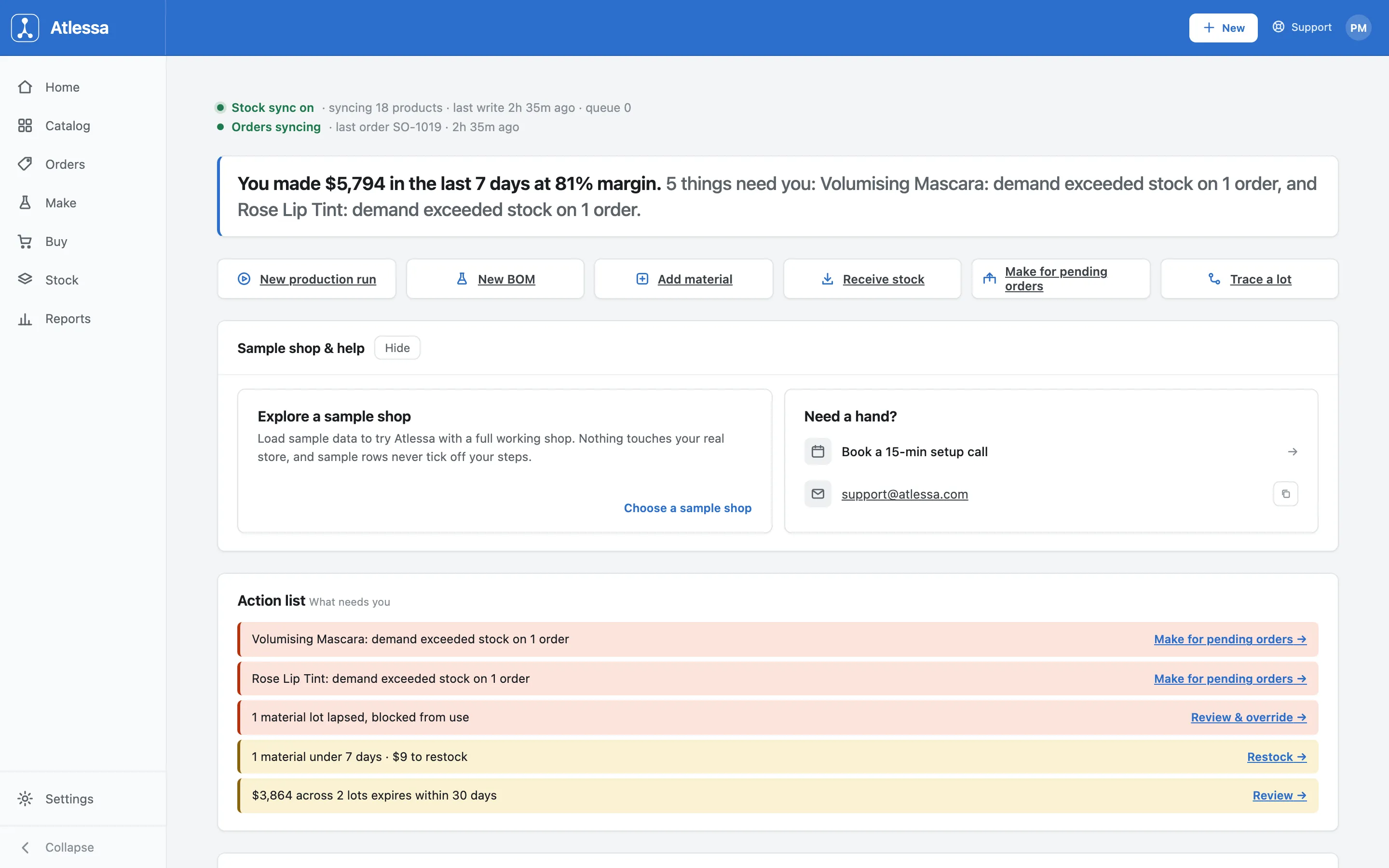
Home pulls the loop onto one screen:
- Status line: confirms Shopify is in sync (here, stock sync on, syncing 18 products, orders syncing).
- Headline: the last seven days, money made and margin, and how many things need you.
- Action list: what needs you, like a product whose demand exceeded stock on an order.
- Quick actions: New production run, New BOM, Add material, Receive stock, Make for pending orders, Trace a lot.
- The numbers you steer by: Open orders (To build, To assign lots, To fulfil), buildable across your products, a margin snapshot, and inventory value on hand at WAC.
Who owns what
Clear ownership keeps you out of double entry. Shopify owns the storefront, products, customers, and orders. Atlessa owns the making side: materials, recipes, production runs, lots, and true cost. Neither reaches into the other's job. Atlessa never edits your Shopify products or customers; it writes your true available stock back, so the two agree.
Common questions
- Do I still use Shopify, and does Atlessa change my products?
- Yes to Shopify, no to your products. Shopify stays the system of record for the storefront, products, and orders. Atlessa adds the making side (materials at real cost, BOMs, production runs that mint finished stock, traceable lots), reads your catalog and orders, and writes true available stock back. It never edits your products or customers, so you run one store with a workshop attached, not two.
- Who is Atlessa for?
- Small-batch makers who buy materials and make the products they sell, like cosmetics, candles, and food. If you turn raw materials into finished goods and sell them on Shopify, Atlessa models the making.
- What is "true cost" or WAC?
- WAC is the weighted-average cost of what you actually paid for the materials on hand, rolled up through your recipes. Because it is real rather than a guessed price, the margins Atlessa shows are honest, and you can see exactly how much cash is tied up in stock.
- Where do I start?
- The easiest start is the sample shop, to click through the whole loop safely first (see The sample shop). On your own store, receive a delivery and build a recipe, then make a batch against it. You do not need to learn it all at once.