Subscription and spend cap
Your plan is a flat monthly fee plus a small charge for each order line over an included allowance, with a spend cap so the total never surprises you. Everything about it lives on one screen, and billing runs through Shopify, so charges and history sit on your normal Shopify invoice.
Steps
- Find billing in Settings, then Plan & billing.
Open Settings; Plan & billing is the first section. It gathers your plan, this cycle's usage, your spend cap, and a link to billing history in one place, so there is nothing to add up by hand. It is the one screen to read to know what you are paying and why.
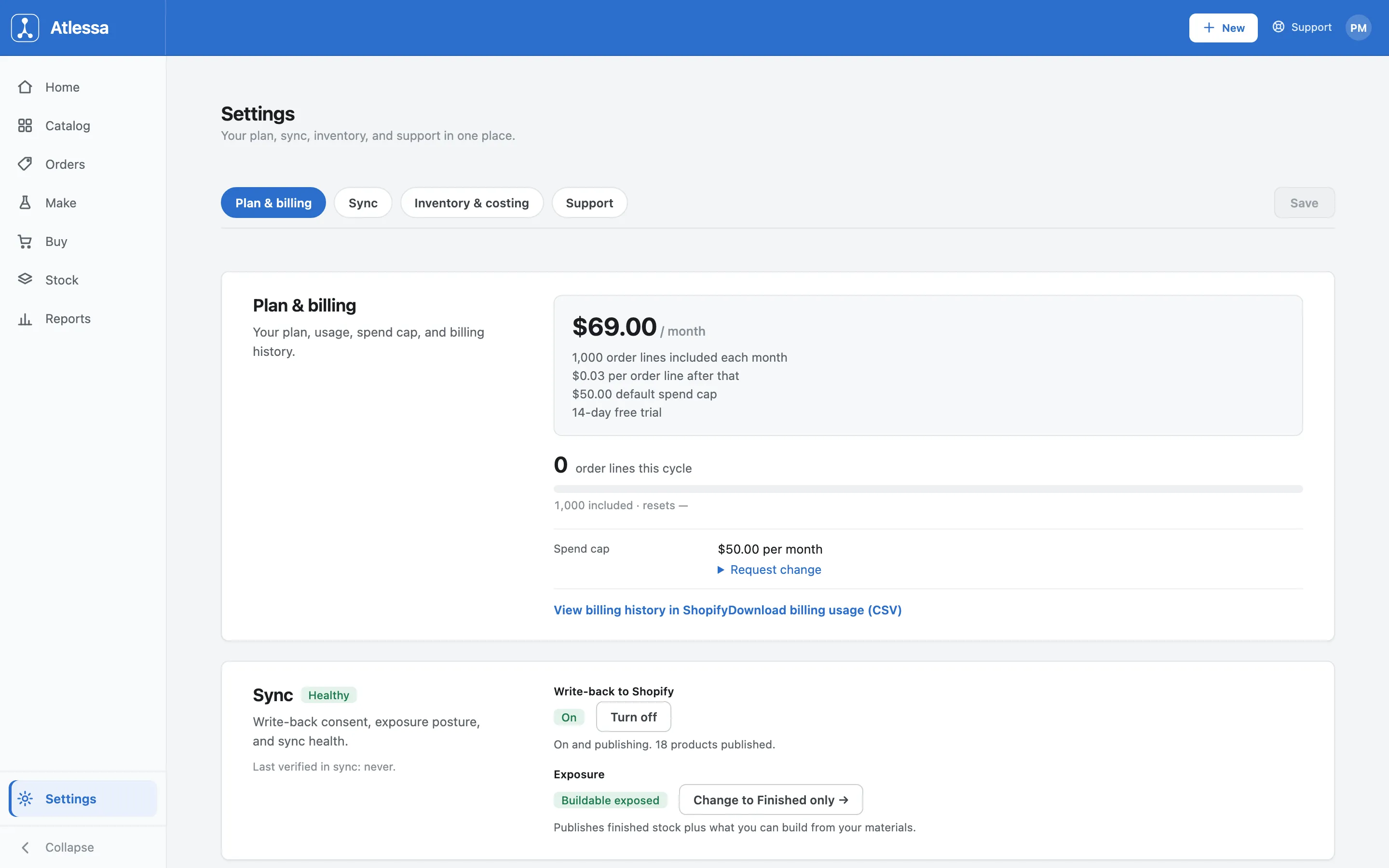
Settings, Plan & billing: the plan card ($69.00 / month), this cycle's usage meter, the spend cap row with Request change, and links to billing history and a usage CSV. - Understand the plan.
The plan card lays out the whole model:
- A flat $69.00 / month.
- That fee includes 1,000 order lines each month.
- Past the allowance, each additional order line is $0.03.
- A $50.00 default spend cap, the ceiling on those extra charges.
- A 14-day free trial when you start.
So a month under 1,000 order lines costs exactly the flat fee; only lines over add. The unit that matters is the order line: an order with three products is three lines, the lines you work in the Orders list. Think about a big month in lines, not orders.
- Watch this cycle's usage.
Under the plan card, the usage meter shows where you are this cycle: order lines this cycle against the 1,000 included, with a progress bar and the reset date. In the sample shop it reads 0, so nothing has been metered yet. It is your at-a-glance check on whether you are inside the allowance or into the per-line charge, and it fills as orders come through.
Because the allowance is per cycle, the meter empties at each reset, so a busy month does not carry its count forward. Watching this bar is the simplest way to see a large order run coming before it hits the invoice.
- Set your spend cap, and view your history.
The Spend cap row shows your ceiling, $50.00 per month by default. The cap is the most the per-line charges can add in a cycle: your bill is the flat fee plus at most the cap, never more, even in a heavy month. That keeps the total predictable. To raise or lower it, use Request change on that row; Shopify asks you to approve the new cap before it takes effect.
Two links sit at the bottom of the section:
- View billing history in Shopify opens your past charges where they live, on your Shopify invoice, because Atlessa bills through Shopify.
- Download billing usage (CSV) exports this cycle's counted order lines, the file to reach for when a charge looks higher than expected and you want to see exactly what was metered.
Common questions
- What does the monthly fee include?
- A flat $69.00 a month covers the subscription and an allowance of 1,000 order lines each cycle. Stay under it and the flat fee is the whole bill; you pay more only when you go over, and even then the spend cap limits how much more.
- What is an order line, and how does the per-line charge work?
- An order line is one line item on one sales order, the same lines you see in Orders. The first 1,000 each cycle are included in the flat fee. Every order line beyond 1,000 is charged $0.03, and those charges are what the spend cap limits.
- What does the spend cap do, and how do I change it?
- It is the monthly ceiling on the per-line charges, $50.00 by default, so a heavy month cannot surprise you. To change it, use Request change on the Spend cap row; Shopify asks you to approve the new cap before it applies.
- What happens when I hit my spend cap?
- Once the per-line charges reach the cap, further order lines are not billed: still metered and counted, just recorded as capped. Nothing in the app stops; sync and every screen keep working, so the cap only holds your bill down, it does not limit Atlessa. To have the overage billed instead, raise the cap with Request change.
- When does the included allowance reset?
- Each billing cycle, Shopify's recurring 30-day interval rather than a calendar month (the first period after your trial runs a little longer). The meter shows the reset date; the count starts again from zero each cycle, so unused allowance does not roll over.
- Where do I see or download my billing history?
- Billing runs through Shopify, so your past charges are on your normal Shopify invoice. Use View billing history in Shopify to open them. For a line-by-line breakdown of this cycle's usage, use Download billing usage (CSV).
- What happens after the free trial?
- New accounts get 14 days free. When it ends, the plan moves to the flat monthly fee, with the same allowance, per-line charge, and spend cap.
- Does the sample or demo data get billed?
- No. Atlessa does not meter demo or fabricated orders, so the sample shop does not count. Only real order lines are metered.
If it is not working
- My usage looks higher than expected.
- Usage is counted in order lines, not orders, so an order with several products counts as several lines. Check your real order volume for the cycle, and download the billing usage CSV to see exactly which order lines were counted.
- I want to change my spend cap.
- Use Request change on the Spend cap row in Plan & billing. The change goes through Shopify, which asks you to approve the new cap before it takes effect.
- Where is my invoice?
- Billing runs through Shopify, so charges appear on your Shopify invoice, not in Atlessa. Use View billing history in Shopify from this page.
- Every screen sends me to a billing page.
- That means you have no active subscription: the trial ended without an approved charge, or a charge was declined. Atlessa then locks, and every screen redirects to a billing screen until you resubscribe through Shopify. This differs from hitting your spend cap, which never locks the app; the lock is only for having no active subscription at all. Approve the charge in Shopify and the app unlocks.