Products and variants
Your products come from Shopify, so you never re-enter them. What Atlessa adds is the making side Shopify does not track: what each product is made of, what it truly costs, every batch you hold, and every movement that ever touched its stock. Open any product and its whole story sits on one tabbed page, from live stock down to a single ledger line.
- Catalog item: anything in your Catalog, a product, a material, or packaging.
- Product: a thing you sell. A variant is one SKU of a product (a size or shade), each its own catalog line with its own stock and cost.
- On hand is total stock, committed is reserved to orders, available is free (on hand = committed + available).
- WAC (weighted average cost): the unit cost of the stock you hold.
- Calculated margin: your Shopify selling price against that WAC.
- Shopify sync: the live link that pulls a product in from Shopify and writes its stock back.
- Cost to make: the per-unit cost rolled up from the product's recipe.
Steps
- Open the Catalog: everything you make, buy, and sell.
The Catalog is every item in your business, split by type: Product, Material, Packaging (the tabs count them, 18 products, 13 materials, 8 packaging, 39 in all). Products sync in from Shopify; materials and packaging you add yourself. The list shows On hand, Selling price, WAC / unit, Calculated margin, and each row's Sync state. So Amber & Vanilla Candle (CNDL-AMBR) reads 29 pcs on hand, $26.00 selling, $13.08 WAC, 50% margin, with a Synced pill. Two buttons sit above the list: Import materials for a bulk load, and + New item to add one. This article is about products; materials get their own.
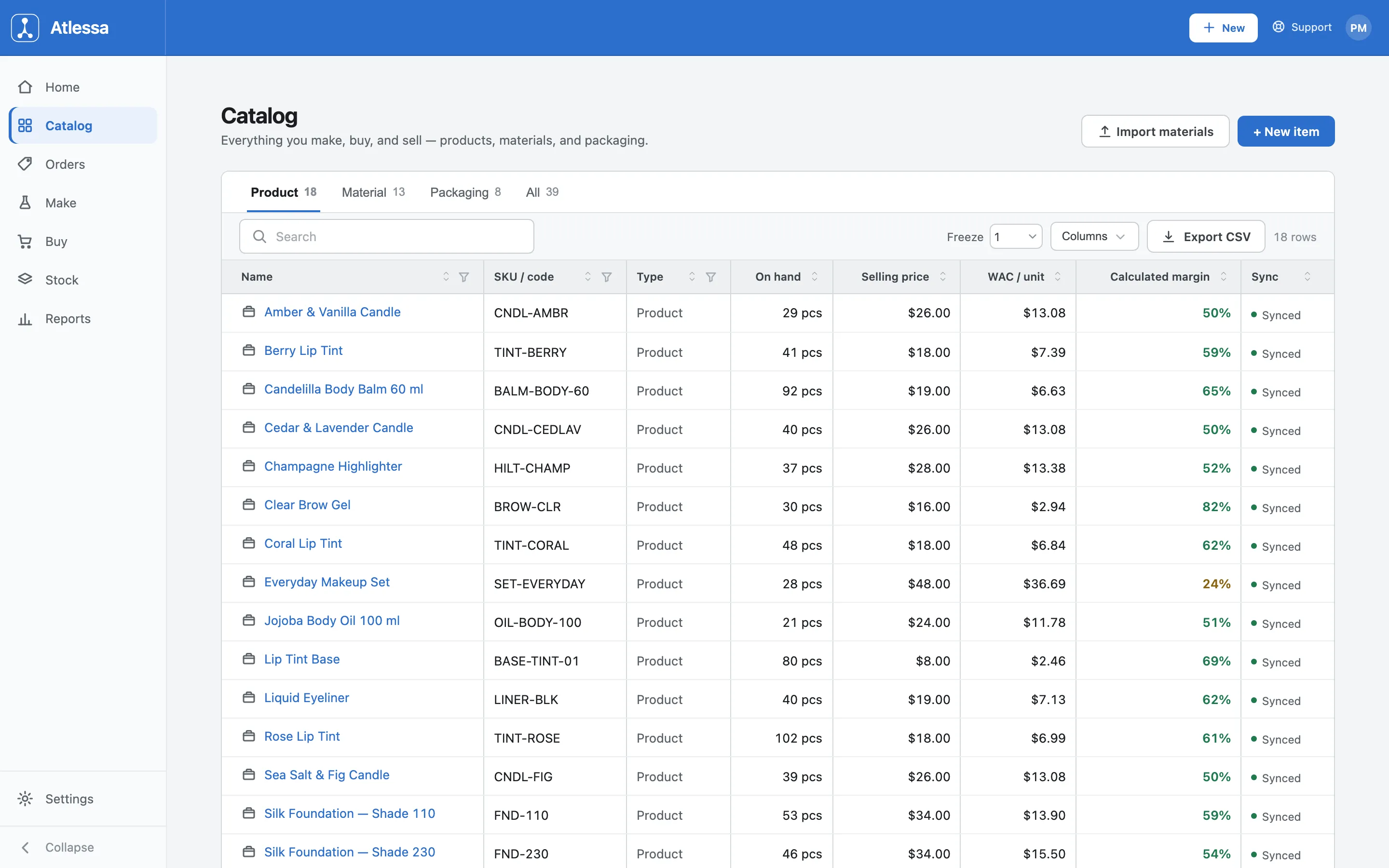
The Catalog: every item split by type, with on hand, selling price, WAC, calculated margin, and sync status per row. - Open a product to its tabbed page.
Click any product to open its item page (here Rose Lip Tint, SKU TINT-ROSE), with a Catalog breadcrumb, an Edit button, and a tab row: Details, Recipe / BOM, Lots, Ledger, Costs. The Details tab leads with four KPI cards: On hand 102 pcs, Committed 102 pcs, Available 0 pcs, Unit cost $6.99 (its WAC). Available is 0 not because the shelf is empty, but because all 102 units are committed to orders (on hand = committed + available; full buckets model in How batches and lots work).
Below, an identity table names the item: Type Product, SKU TINT-ROSE, Internal code TINT-ROSE, Stock unit pcs, and a Shopify sync line, "Synced, Linked to Shopify". That line means the product is tied to a Shopify product, so its stock writes back as you make and sell. Its identity (name and SKU) is managed in Shopify, read-only here; the Atlessa-side settings you can change (trace mode, control date) live on the Edit sheet.
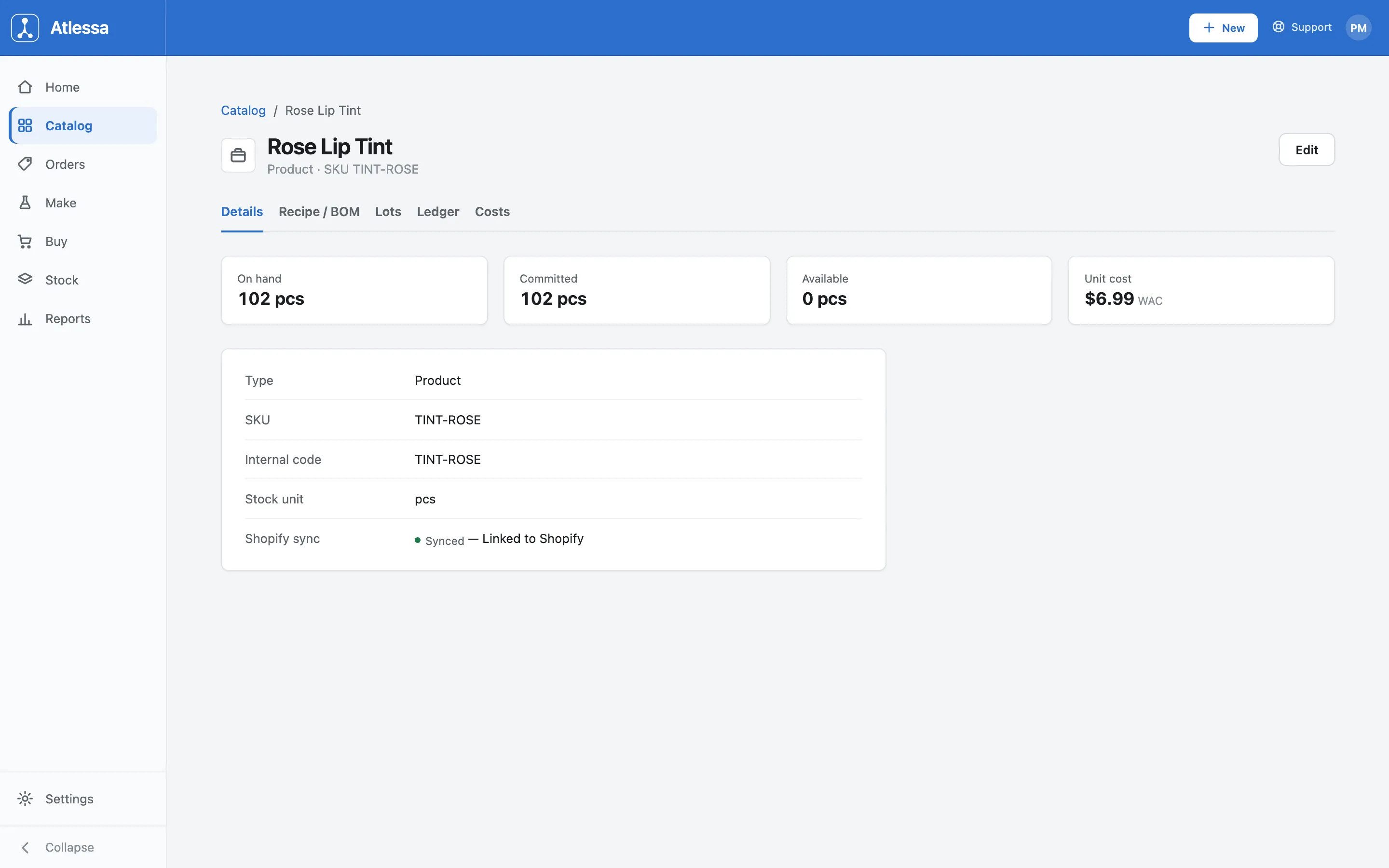
A product's Details tab: the four KPI cards (on hand, committed, available, unit cost at WAC) and the identity table with its Shopify sync state. - Recipe / BOM tab: what the product is made of.
The Recipe / BOM tab is the read view of the product's bill of materials: a table of Component against Qty per unit made. So Rose Lip Tint is one Lip Tint Base, 0.005 kg Jojoba Oil, 1.5 g Mica Pigment Rose Gold, one Lip Tint Tube 5 ml, one Round Product Label, one Printed Carton. A Cost to make $6.99 line rolls those up into a per-unit cost. This tab is read-only: you build or change a bill of materials under Make > BOMs (see Bills of materials), not here.
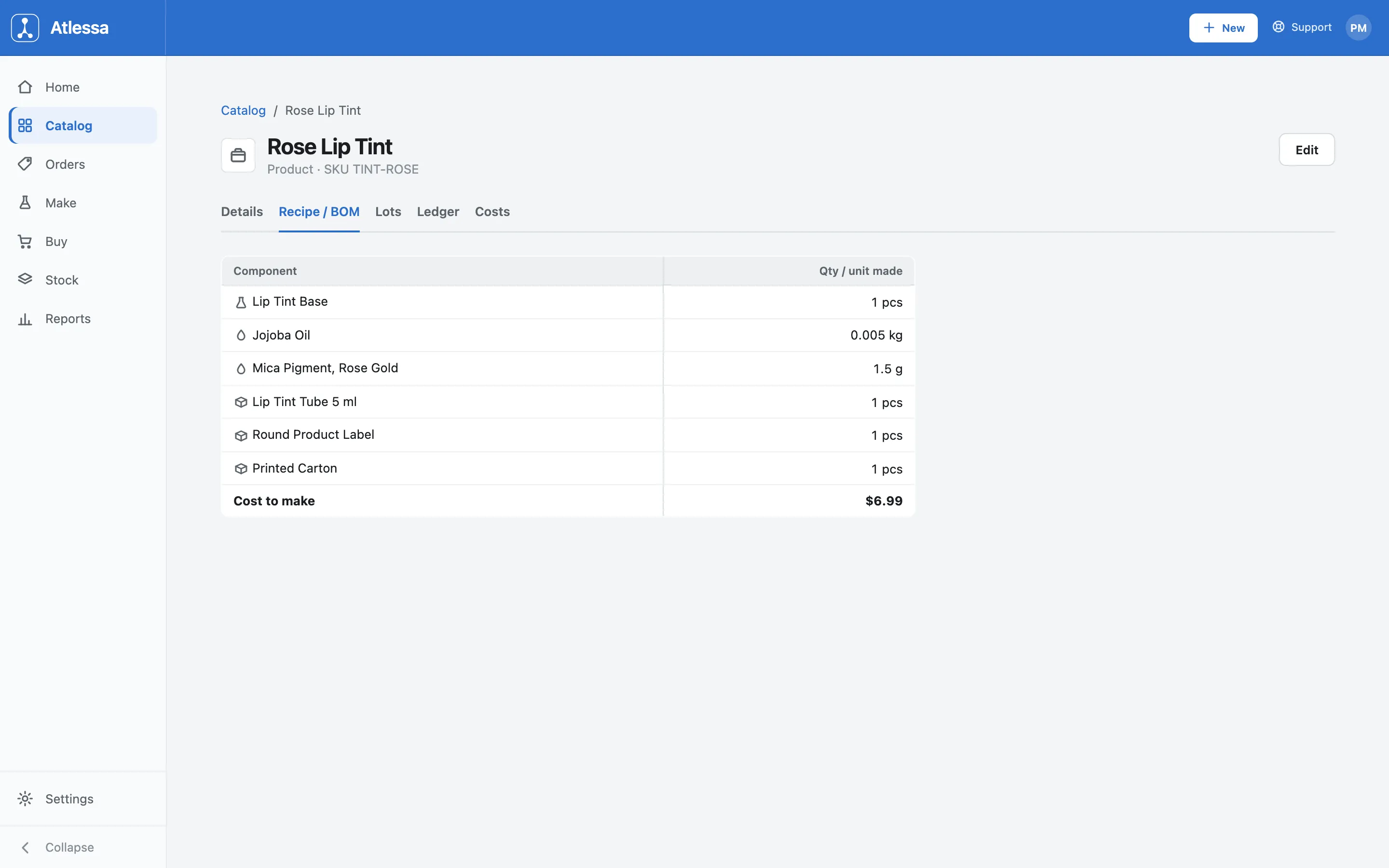
The Recipe / BOM tab: the read-only recipe (component and quantity per unit made) with the rolled-up cost to make. - Lots tab: every batch of this product in stock.
The Lots tab lists every finished batch you hold ("Batches, 102 pcs across 1" here), each with received date, Available and Committed, any Quarantined units, Value / unit and Lot value, control date, and Status. So lot PRDC-0002 was received 27 Aug 2026, is 102 pcs committed, valued at $6.99 a unit ($712.98 for the lot), control date 24 Apr 2027, status In stock. The status tabs (All, In stock, Flagged, Lapsed, Not yet available, Quarantined, Approaching) filter batches by how they stand against their control date, and a Receive stock button receives a new batch from here.
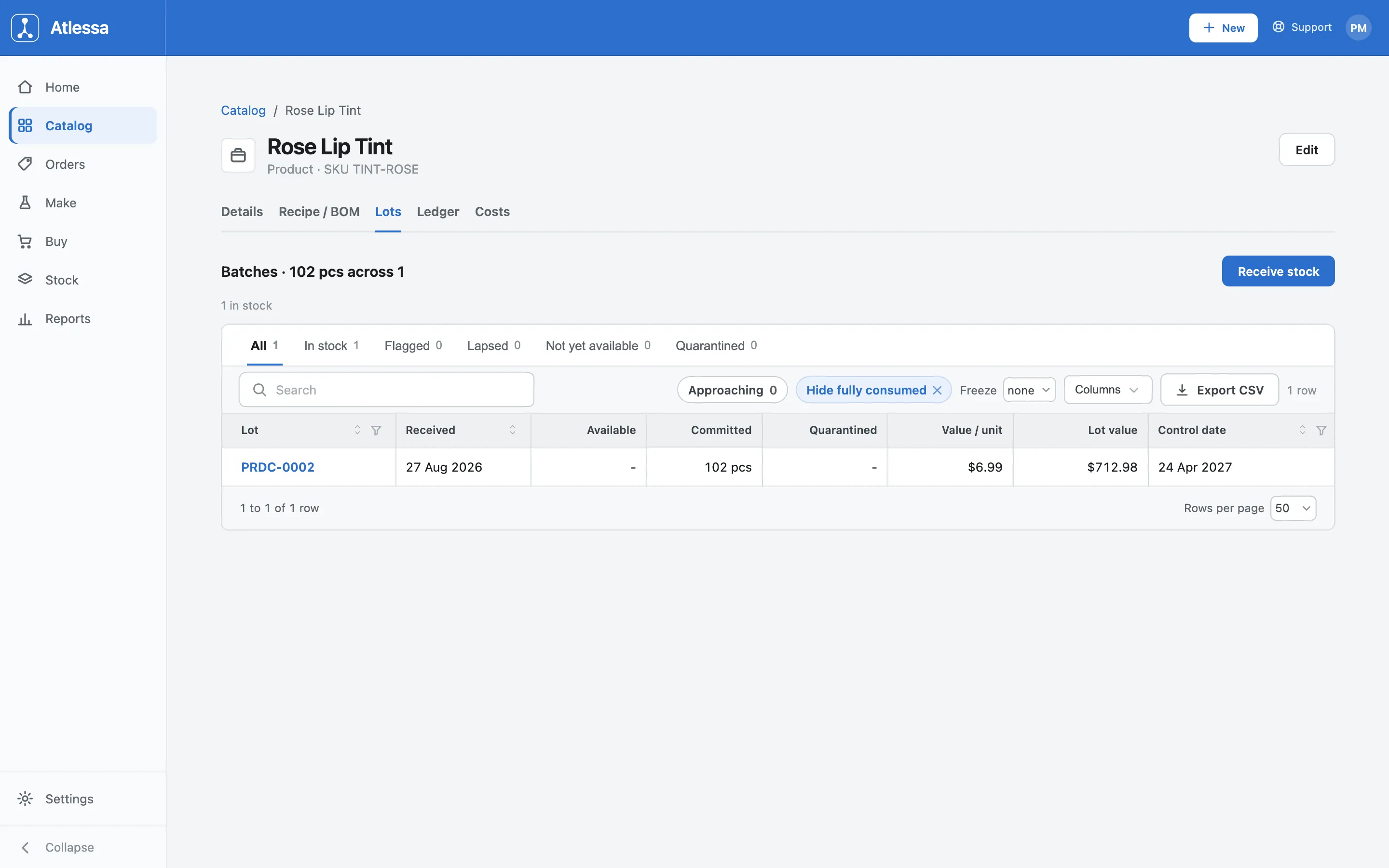
The Lots tab: every finished batch, with available, committed, value, control date, and its status against that date. - Ledger tab: the product's whole stock history.
The Ledger tab is every movement that ever touched this product's stock, read bottom-up as its life story: finished by a run, reserved to orders, used to fulfil them, each line carrying a running Balance and the run or order Reference that caused it. It opens with the run that made it (Finished Rose Lip Tint, +120 pcs, RUN-2-A), works through a reserve-then-fulfil pair per order (SO-1009: 10 pcs held, then minus 10 pcs), and ends at the current reservation (102 pcs held, SO-1019). It is searchable and exports to CSV (Date, Movement, Qty, Balance, Reference), the audit trail behind the KPI cards.
The last tab, Costs, is a small table of Cost component against Per unit: Unit cost (WAC) $6.99 and Cost to make (from recipe) $6.99. It sets what your stock is valued at next to what the recipe says a unit costs, so you can compare and catch a recipe that has drifted from what you pay.
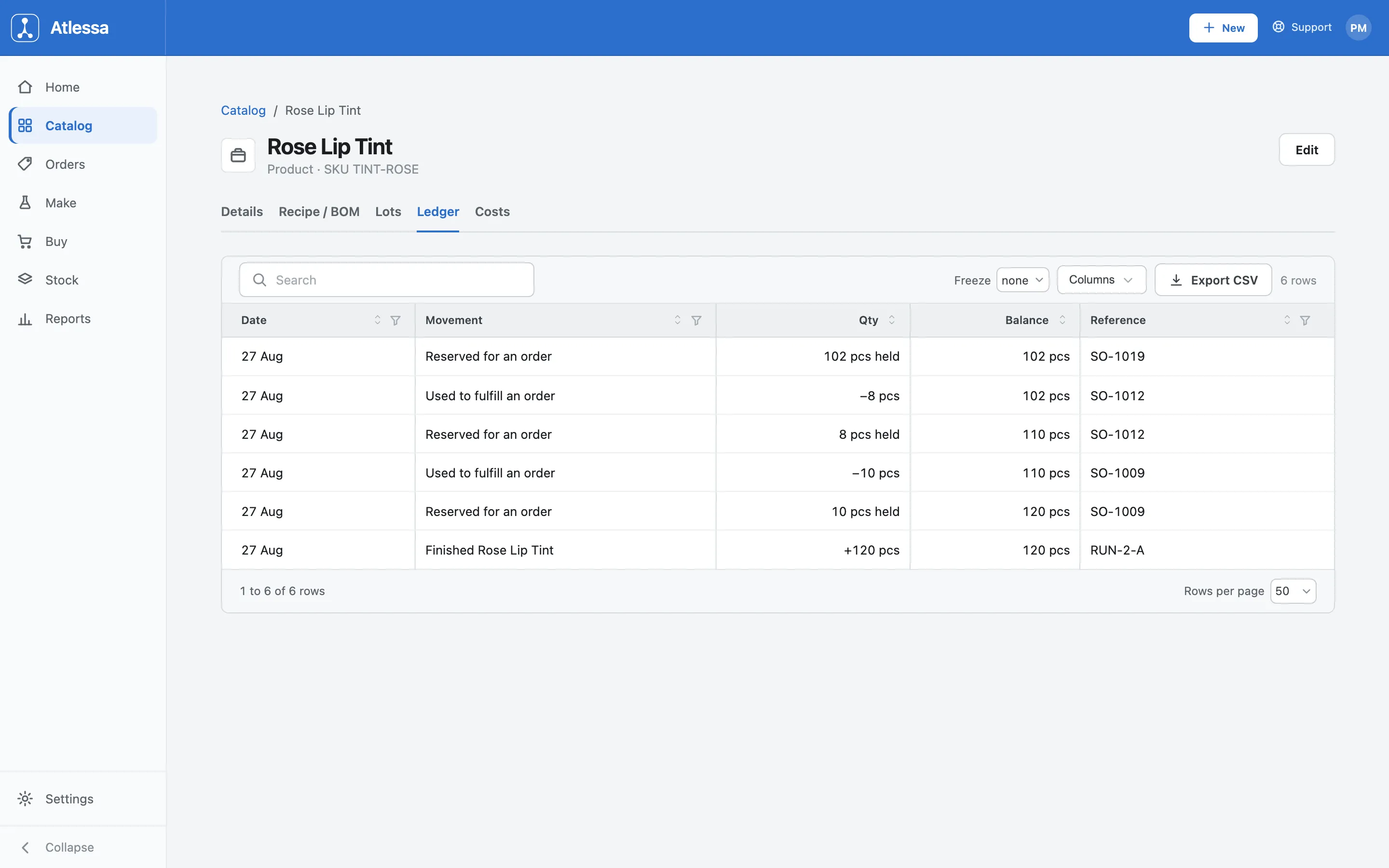
The Ledger tab: every movement (finished by a run, reserved to an order, used to fulfil) with a running balance and its reference.
Common questions
- What do on hand, committed, and available mean?
- On hand is total stock, committed is reserved to orders, available is what is free to promise elsewhere. They add up: on hand = committed + available. A product can show plenty on hand and still be 0 available if every unit is committed.
- Where does the Unit cost / WAC come from?
- WAC is the weighted average cost of the stock you hold, updated every time you receive a batch (each receipt's landed cost blends in, weighted by quantity; Receive stock covers how). It is what the KPI card and Costs tab show, and what your stock value and margins build on.
- What does "Synced" mean, and where do products come from?
- Products come from Shopify. The Synced pill (and "Synced, Linked to Shopify" on Details) means the item is tied to a Shopify product, so it pulls in from your store and its stock writes back as you make and sell. Atlessa adds the manufacturing layer (stock, cost, recipe, lots, ledger) on top; it does not replace Shopify as where products are created.
- The Recipe / BOM tab is read-only. Where do I edit the recipe?
- Here you only read the recipe and its cost. You build or change the bill of materials under Make > BOMs (Bills of materials). The tab reflects the current BOM; edit the BOM and this view follows.
- What does the Ledger show?
- Every movement that touched this product's stock, with a running balance and the run or order behind each: finished by a run, reserved to an order, used to fulfil one. Read bottom-up, it is the whole stock history, and it exports to CSV.
- How is the calculated margin worked out?
- Your Shopify selling price against your WAC. So it is what the product makes at its current cost of stock, not a list price you typed. If the price or the WAC moves, the margin moves with it.
- What does the Costs tab compare?
- Two per-unit numbers side by side: Unit cost (WAC), what your stock is valued at, and Cost to make (from recipe), what the recipe rolls up to. Together they tell you whether what you pay still matches what the recipe assumes.
- Can I create a product here, or must it come from Shopify?
- Products come from Shopify and sync in; that is where you create and edit the product itself. In Atlessa you add the making side (recipe, lots, cost) on top. The + New item button on Catalog adds materials and packaging, which do not live in Shopify.
- How do I discontinue a product? Can I delete one?
- A product is never hard-deleted. It follows an active and archived lifecycle, so one you stop selling is archived, not removed, keeping its history intact: lots, ledger, and every movement stay traceable. You archive it from the Edit sheet, where the Atlessa-side settings (trace mode, control date) live; its identity still comes from Shopify.
- What about variants?
- A product can have several variants (SKUs), one shade or size each. Every variant is its own catalog line with its own stock, WAC, lots, and ledger, so you cost and trace each on its own.
If it is not working
- Available shows 0 but on hand is high.
- The stock is all committed to orders. On hand = committed + available, so when committed equals on hand, nothing is free. It frees up as those orders are fulfilled or change; check the Ledger tab to see which orders hold the units.
- The margin looks wrong.
- Calculated margin is your Shopify selling price against your WAC, so check both. The price comes from Shopify (fix it there), and the cost is your weighted average from receiving, which moves as you receive at different landed costs. A surprising margin usually traces to one of those two.
- A product is missing from the Catalog.
- Products sync from Shopify, so a missing one has not come across yet. Check it exists in Shopify, then run the whole-catalog import from Home, then Import from Shopify (Settings, then Sync holds only write-back consent, exposure, and health, not the import). An item that shows Not linked is not matched to a Shopify product, which is normal for a materials-only item but not for a product you sell.