How inventory sync works
Shopify owns your orders and your storefront. Atlessa knows your true stock: what you have made, and what you could still make from your materials. Inventory sync is Atlessa writing that number back to Shopify, so what a customer sees available is what you can actually ship. You control two things, whether it publishes and which number, and Atlessa keeps every linked product in step.
Steps
- Find sync in Settings, then Sync.
Open Settings and go to the Sync section. It gathers the three controls into one place:
- Write-back consent (on or off).
- Exposure posture (which stock number you publish).
- Sync health (whether write-back is actually running).
The section title carries a status pill (Healthy here), so a glance tells you the shape of your sync. Under it, a "Last verified in sync" line reports the last time Atlessa confirmed the write-back reached Shopify. One thing to know: Atlessa v1 is single-location, so your stock lives at, and write-back targets, your shop's primary Shopify location. The "Receiving into: Studio" label you meet in Receive stock is just that primary location's name, not a setting you pick.
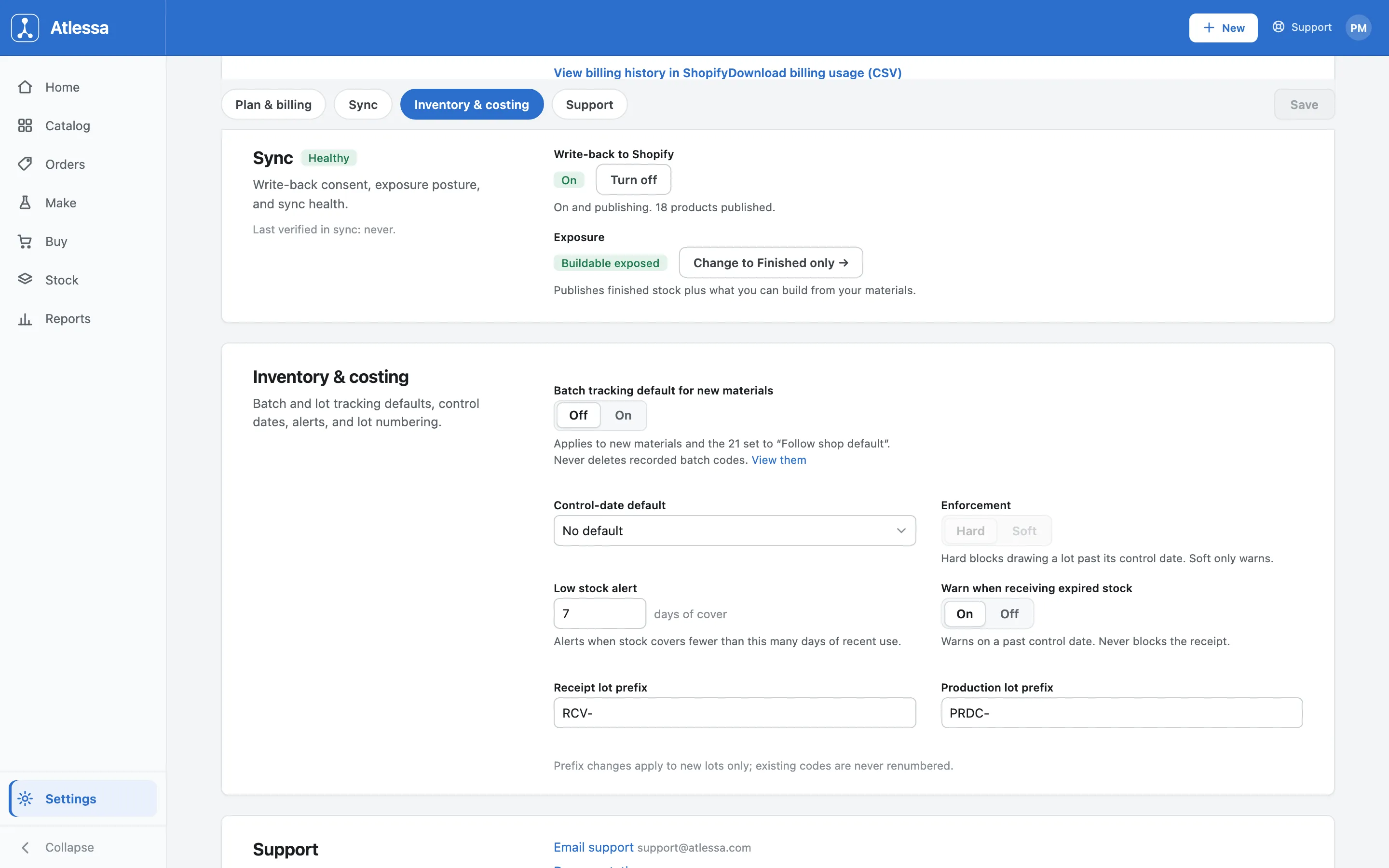
The Sync section of Settings: the Healthy status pill and Last verified line on the left, the Write-back to Shopify and Exposure controls on the right. - Turn write-back on or off.
The Write-back to Shopify control is the consent switch. When On, Atlessa publishes your stock levels as they change; the note reads "On and publishing. 18 products published." That count of linked products Atlessa is writing doubles as a check that sync reaches the catalog you expect. Turning it off (Turn off) stops writing entirely. Nothing already published is erased: your Shopify quantities freeze at their last written value until you turn write-back back on.
Consent is given once for the whole catalog, not product by product. You do not pick which products sync; when write-back is on, Atlessa keeps every linked product in step.
- Choose what stock you expose.
The Exposure control decides which number Shopify sees:
- Finished only publishes just your on-hand finished stock, what you have made and can ship today.
- Buildable publishes finished stock plus what you could build from the materials you hold, so a made-to-order product can still show as available and a customer can order ahead of production.
The screen here reads "Buildable exposed", with a "Change to Finished only" action that always names the posture you are switching to. Switching is not an instant flip: Atlessa first runs a preview showing exactly which listings' published quantities would change, and the new posture applies only after you confirm it.
- Check sync health.
The sync health readout confirms write-back is working. The status pill next to the Sync title has three states:
- Healthy: Atlessa is publishing and Shopify is accepting the writes.
- Attention: write-back is on but 0 products are published, usually because your products are not linked to Shopify products yet, so there is nothing to write. Link them and the count climbs and the pill returns to Healthy.
- Off: write-back consent is off, so Atlessa is not publishing at all.
The Last verified in sync line tells you when a write was last confirmed. On a shop that has not published yet it reads "never"; once it has published, the line carries a real timestamp. Together the pill and the line tell you, without leaving Settings, that your storefront numbers are current.
Common questions
- What does write-back do, and which direction does it go?
- Atlessa publishes your stock levels to Shopify so the storefront shows the right availability. It is one-directional: Atlessa computes true available stock and writes it to Shopify, not the reverse. Shopify stays the system of record for orders and the storefront; Atlessa only supplies the availability number.
- What is the difference between Finished only and Buildable, and which should I pick?
- Finished only publishes just the finished stock on hand, so it only shows what you can ship today. Buildable adds what you could build from your materials, so a made-to-order product can sell ahead of production. Pick Finished only to promise only the shelf; Buildable to take orders you will make to fulfil.
- Can Buildable exposure oversell?
- It can, in one case. If a material is shared across several products, it can be counted toward more than one product's buildable number. If those products all sell at once, you can promise more than your materials cover. Finished only avoids this by publishing only made stock, so it is the safer posture when shared materials are a worry.
- What happens if I turn write-back off?
- Atlessa stops publishing: your quantities freeze at their last written value until you turn write-back back on, and nothing already published is removed.
- Does sync change my orders?
- No. Sync only writes stock levels. Orders live in Shopify, which remains the system of record for them and for shipping. Turning write-back on or off, or changing exposure, never touches an order.
- What do the Healthy status and the Last verified line mean?
- Healthy means write-back is running and Shopify is accepting the writes. The pill reads Attention when write-back is on but nothing is published yet (usually your products are not linked to Shopify products), and Off when consent is off. Last verified in sync is the last time Atlessa confirmed a write reached Shopify; "never" means it has not published for the first time yet.
- How many products is Atlessa publishing?
- The note under Write-back to Shopify: "18 products published" here. It is the count of linked products Atlessa is writing, so if it is lower than expected, some products may not be linked to a Shopify product yet.
If it is not working
- My Shopify stock is not updating.
- Check that Write-back to Shopify is On in Settings, then Sync. If it is off, Atlessa is not publishing (your Shopify quantities stay frozen); turn it on and let it publish.
- My storefront shows more available than I have finished.
- You are on Buildable exposure, which publishes finished stock plus what you could build from your materials. If you do not want to expose buildable stock, use Change to Finished only so Shopify sees just your on-hand finished stock.
- Sync health is not Healthy, or Last verified reads never.
- The pill reads Off when consent is off, and Attention when write-back is on but 0 products are published (usually your products are not linked to Shopify products yet). If Off, turn Write-back On; if Attention, link your products. Once a write reaches Shopify the pill reads Healthy and Last verified carries a real time.